An executive's OPSEC is a system, not a set of apps: separated identity contexts, a protocol for confirming transfers, a locked phone number, and rules for the family. Start not with tools but with a threat model — who can assemble what about you. Then comes the identity architecture, defence against a deepfake call, and footprint removal. If the definition of OPSEC isn't familiar yet, read what operational security is first.
Your perimeter is not your work laptop. When I audit a founder's or executive's external footprint, the laptop with corporate MDM is usually the most protected point they own. The breach goes around it: through personal email, an assistant, a domain registered to a private address, or a spouse's story with a geotag.
The difference between "knowing about OPSEC" and "having OPSEC" is a system held together not by willpower but by how your contexts are built. Below is how to assemble it — step by step, with specific tools, and without turning your life into a bunker.
The core idea: the goal isn't to hide everything. It's to break connectivity — to remove the points where scattered data stitches into a map of "where you are, with whom, what you own, and who can be used to reach you."
Short version: OPSEC is about connectivity, not secrets#
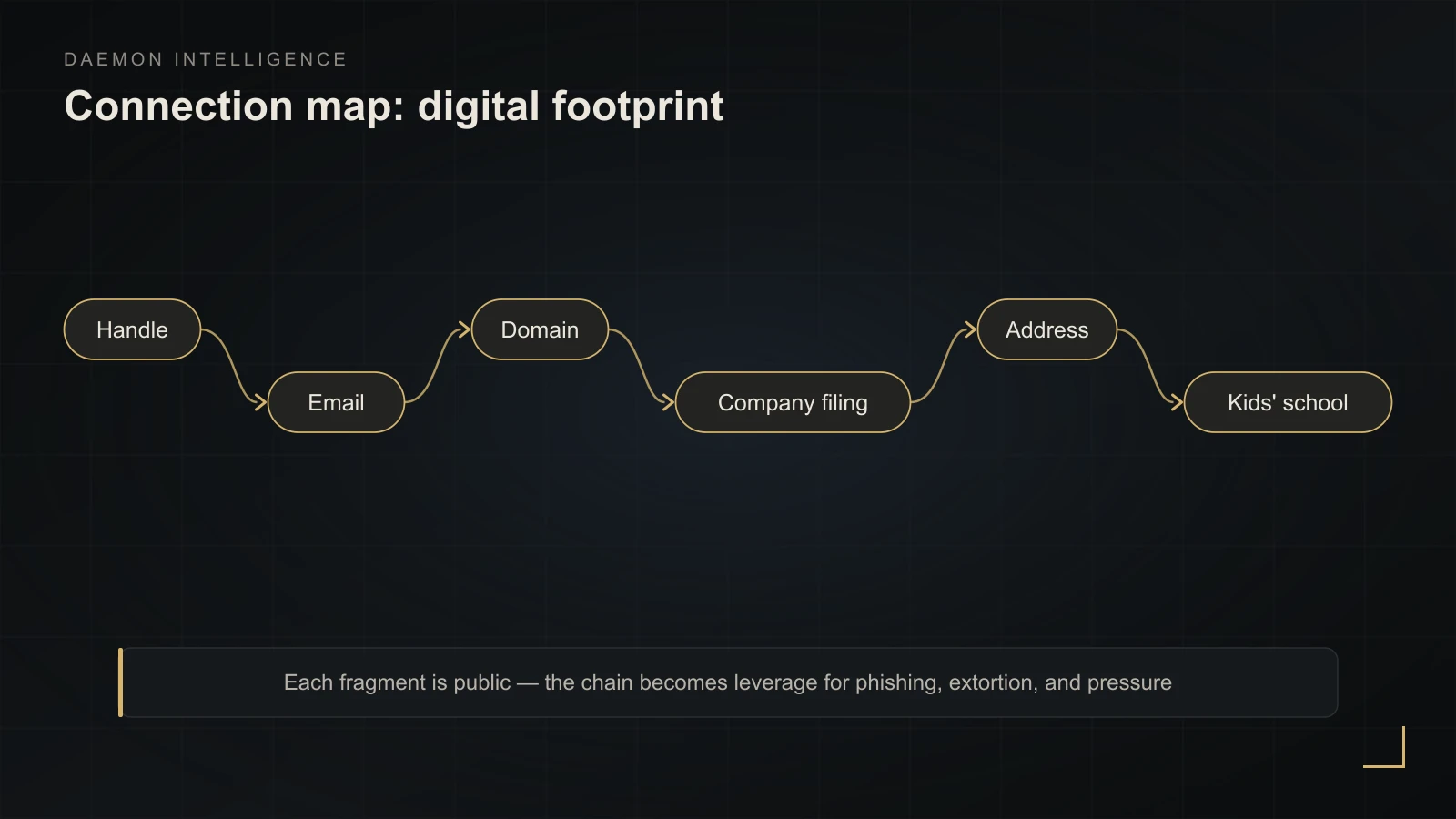
A single detail is rarely dangerous. The sum is. An old handle leads to an email, the email to a domain, the domain to a company filing, the filing to an address, the address to the kids' school. Each fragment is public and harmless; the chain is already leverage for phishing, extortion, or pressure in a negotiation.
I covered the full definition, the history of the term, and the difference from cybersecurity in what OPSEC is — I won't repeat it here. What follows is practice only: what an executive should actually do.
Start with a threat model, not with tools#
The most expensive mistake is buying "security" as apps. First you need answers to five questions; this is an adaptation of the EFF Surveillance Self-Defense method:
- What am I protecting? Write a short list of critical information: routes, ownership structure, deals in preparation, access credentials, family contacts. That's your compass — everything else is secondary.
- From whom? Not "hackers in general," but specifically: a competitor, an ex-partner in conflict, a social-engineering fraudster, a careless contractor, a robber who picks targets by open signals of wealth.
- How bad is it if the protection fails? A collapsed deal, stolen funds, a threat to the family — different weights.
- How likely is it? Your mobile carrier has the technical ability to see your traffic, but the likelihood it leaks it to harm you is low. So it isn't your priority.
- How much am I willing to invest? Money, inconvenience, and attention are a finite resource.
From this comes the skill the guides stay silent about — deliberate risk acceptance. If the cost of protection exceeds the real risk, you consciously don't protect something and don't spend energy on it. Paranoia is protection without a threat model: the resource goes to the improbable, and nothing is left for the likely. Rank threats by "impact × likelihood," close the top of the list, and accept and forget the bottom.
Identity architecture: how to actually separate contexts#
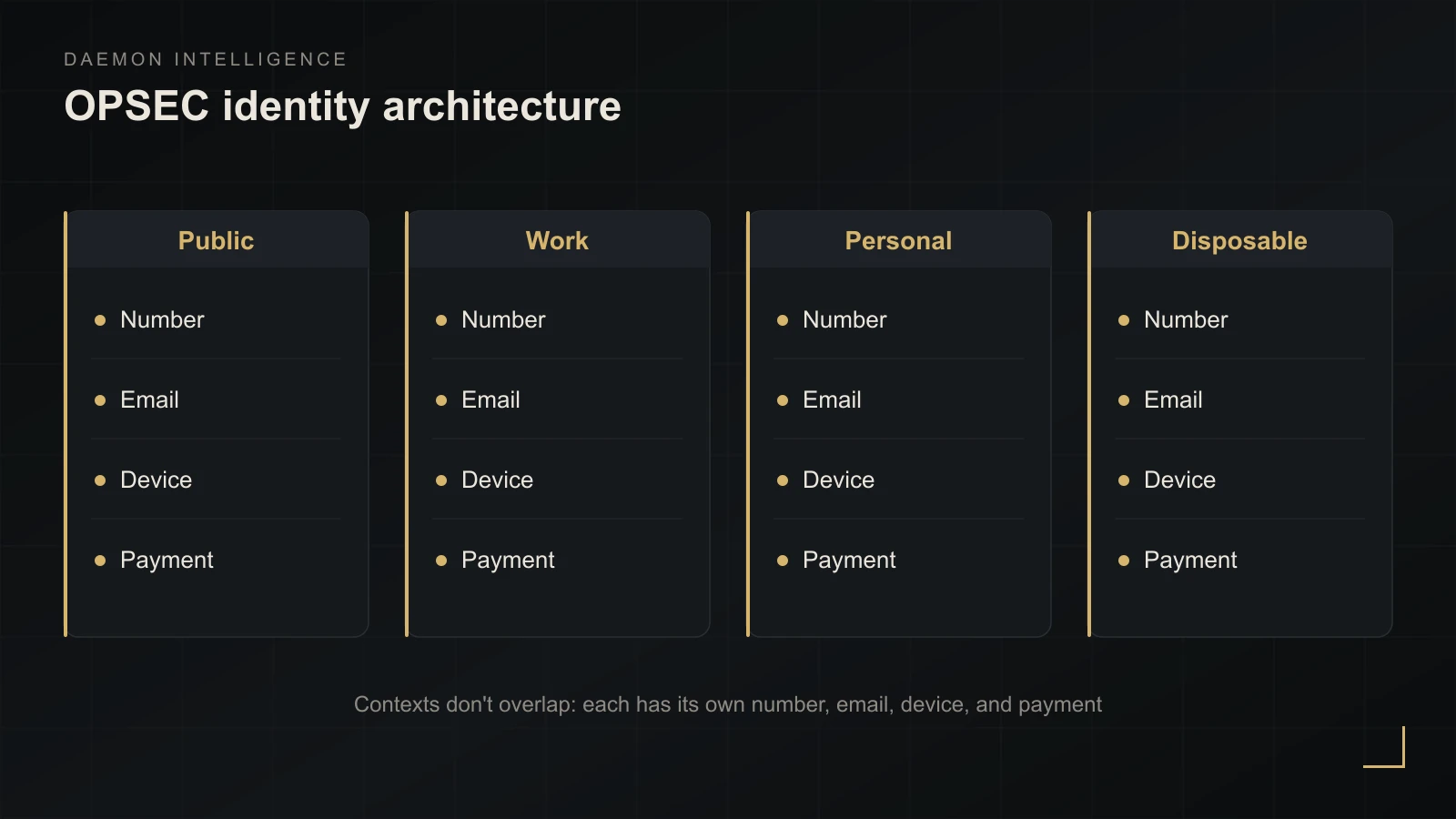
"Separate personal and work" is advice nobody turns into a scheme. Here it is as one. Compartmentalisation means each context has its own set of identifiers, and they do not overlap. A working model for a legitimate executive (not an activist's anonymity):
| Context | Phone | Browser/device | Payment | Rule | |
|---|---|---|---|---|---|
| Public (brand, cards, social) | Virtual number | Public address / alias | Separate browser profile | Company / corp card | Never tied to your personal number and address |
| Work (team, deals) | Corporate number | Corp email + per-service alias | Work device | Corp account | Don't mix with personal cloud |
| Personal (family, banks, documents) | Primary SIM with port lock | Private inbox + unique aliases | Personal device | Personal cards | Number and email stay out of public view |
| Disposable (sign-ups, promos) | Virtual number | "Bait" alias | Guest profile | Virtual card | A leak doesn't touch the other contexts |
The tools this is built on (current as of 2026):
- MySudo — up to nine separate "personas," each with its own number, email, and profile. Your real number appears nowhere public, which also reduces SIM-swap and spam exposure.
- SimpleLogin (open-source, part of Proton) — a unique email alias per service. On a breach you disable one alias instead of changing your main address. Sites never see the real inbox.
- Proton Mail as the "anchor" private mailbox behind the aliases.
Day-one practice: write down how many services currently hang on one number and one email — that's your connectivity. Move banks, government services, and crypto wallets to the personal context with a hardware second factor. Route all new sign-ups through an alias. Keep public contacts on a virtual persona only.
Identifiers are half the job. The other half is behaviour#
Even without shared logins, contexts link through behaviour: writing style, recurring turns of phrase, activity hours, devices. So separate not only mailboxes but habits: a different tone in public and private, distinct devices, different times. One connectivity mistake collapses the whole separation at once — like a single reused handle, from which the rest of the accounts and the email get reconstructed.
Why Signal and a VPN won't save you#
The most expensive misconception: "I installed Signal and a VPN, so I'm protected." A tool solves a narrow task; it doesn't replace discipline.
Consider Signalgate (March 2025): US administration officials discussed details of a strike on targets in Yemen in a Signal group chat and accidentally added a journalist (Wikipedia write-up). Signal is cryptographically sound — but it isn't certified for state secrets, and the failure wasn't in the encryption; it was in what was said and to whom. Map that onto business: the safety of a channel is defined not by the app but by the content of the conversation and the list of participants.
Compare messengers by metadata, not by the word "encryption":
| Messenger | Registration | Metadata | Who it suits |
|---|---|---|---|
| Signal | Requires a number (since March 2024, usernames let you hide it from contacts) | E2EE + sealed sender; the server holds only account-creation and last-connection dates | The best balance for most executives |
| Threema | No number or email — a random ID | No server-side archive or contact graph | When an account must not be tied to a number |
| Session | No number or identity | Routing through random nodes, maximum metadata protection | High threat model, willingness to accept friction |
On VPNs, briefly and honestly: a VPN does not give you anonymity. It hides traffic from your internet provider but centralises the same metadata with the VPN operator — who can be compelled or breached. Tor is stronger on network anonymity, but even it fails if your device is compromised or you log into your personal email. People get caught on behaviour, not on encryption.
Verification: a protocol against the deepfake call#
An executive's voice is cloned from a short clip of public video, and the "call from the boss" urgently asking to confirm a transfer has become a mass scheme. The FBI IC3 annual report for 2025 added a dedicated AI-fraud category for the first time — 22,364 complaints and nearly $893M in losses; most often it's a layer on top of ordinary email compromise.
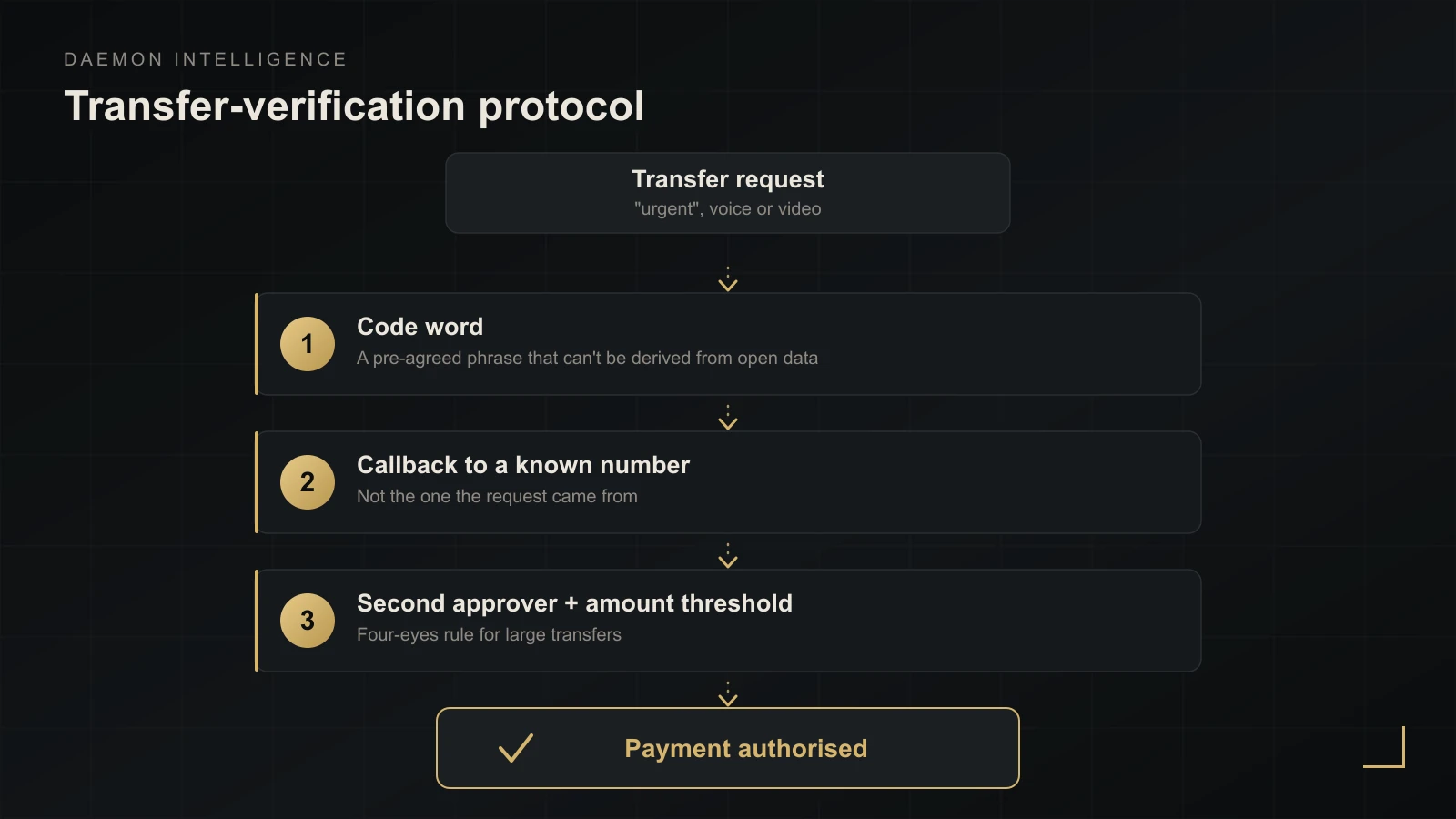
There's no reliable "detect the fake on the fly," so defence rests on a procedure synthetic media can't bypass:
- A code word. A pre-agreed, non-obvious phrase to confirm identity before any sensitive action — in the family and in the finance context alike. Not derivable from open data.
- Confirmation over an independent channel. Confirm any request for a transfer or a change of banking details by calling back a previously known number — not the one the request came from.
- Four-eyes rule and an amount threshold. Transfers above a set threshold require at least two independent approvers. Neither voice nor video authorises a payment on its own.
Number, SIM-swap, and accounts#
A phone number is the hub that account recovery and often the second factor hang on. So:
- Take SMS out of the second factor for critical accounts (the hub email, bank, crypto, corporate consoles). SMS is intercepted during a SIM-swap. Use an authenticator app or hardware keys — passkeys, YubiKey, Titan. Even session-stealing phishing can't take those.
- Lock number porting. Carriers now have explicit controls: blocking a port-out to another carrier and blocking SIM/eSIM changes within the network. Lift them only for a legitimate transfer and re-enable immediately afterwards.
- Turn on alerts for a SIM or carrier change to an inbox you actually read. Any unexpected unlock is a reason to act at once.
The number isn't the only vector: if you suspect the device itself is compromised, check it separately — how to check your phone for spyware and tapping.
The base layer of hygiene (passwords, updates, session review) sits in a separate piece — 10 digital hygiene mistakes. Without it, the identity architecture doesn't hold.
AI-OSINT: why "just be careful" no longer works#
"Don't post too much" was written for an era when a profile was assembled by an analyst by hand. Now automation does it. Face search like PimEyes indexes billions of images and finds where your face surfaces across the open web — enough to link a public persona to a private profile you thought was separate. Language models have made the correlation itself cheap too: what took hours of work now runs through a pipeline in minutes.
The practical takeaway: caution alone isn't enough; you need the architecture from the section above. Add photo hygiene — fewer unique "anchor" faces in the open, different avatars for public and personal contexts, and a regular self-check by face as part of the audit.
Footprint removal: getting yourself out of the open#
The realistic goal is to reduce availability, not to "disappear." Full removal is unattainable; you strip the hottest points: address, number, face, links to family. The removal sequence itself — what to file, where, and in what order — is set out in the guide on removing your personal information from the internet.
Self-check of your footprint (free — start here):
- search for your name, handles, and emails;
- Have I Been Pwned — which breaches your email appears in;
- Sherlock and WhatsMyName — one handle across hundreds of sites;
- face search — where your photo surfaces (also a test of "what an attacker would find"); what to do with what you find is covered in how to block face search.
For the legal layer, most jurisdictions now give you a right to demand deletion of your personal data: the EU/UK GDPR right to erasure, search engines' right-to-be-forgotten forms, and — in the US — services that opt you out of data-broker databases. One caveat: brokers repopulate records, so removal is a subscription, not a one-off action. Start by seeing where your data has already surfaced — removal gets cheaper once you know what is actually out there.
Family and travel: the weakest perimeter#
For a wealthy individual it's easier to get in through a spouse, an assistant, or a teenager than through the corporate IT team. And the stakes here are higher than digital: the rise in physical attacks aimed at seizing crypto assets ("wrench attacks") is tracked by TRM Labs — 2025 was a record year (around 60 documented cases, up from 41 in 2024), and targets are usually identified by open signals of wealth.
A minimum protocol for the inner circle:
- one family code word (the same as in the verification section);
- no real-time location posting — only after the fact;
- turn off public location sharing (watches, Find My, kids' trackers), a car's trip history, and photo geotags;
- remove the "invisible infrastructure": a child's account that shows a school uniform, parent chats with addresses, smart speakers with request history;
- run business trips without publishing the itinerary in advance; make bookings under a corporate name;
- vet the people who have keys to the house — nanny, driver, housekeeper — and give them the same rules (how to vet household staff).
For crypto, add split access (multisig, timelocks) — it lowers the value of coercing any single keyholder.
OPSEC as a programme, not a one-off heroic#
A one-time "cleanup" is useless: the perimeter grows back within six months. What works is a cycle.
As a programme for a company or family office:
- assigned roles — who owns the perimeter, who approves transfers;
- a communications policy — which topics and channels are acceptable, who may request access;
- audit triggers — before a deal or round (the other side gets its own pass: due diligence on a company, or how to check a Russian company for a Russian one), on a rise in public profile, after an incident, plus once a quarter;
- metrics — time to revoke a departed employee's access, share of critical accounts on hardware 2FA, number of identifier overlaps between contexts (target: zero).
And the part almost nobody writes about — sustainability. OPSEC breaks not from ignorance but from fatigue: each measure is manageable alone, but their sum wears you down and you start cutting corners. In a Sophos survey of 5,000 professionals, 69% said security fatigue and burnout grew over the year. Hence the rules of "durable" OPSEC:
- automate to take decisions out of the moment (password manager, passkeys, aliases by default);
- protect the top five items on the critical list, not everything at once;
- design for minimum friction — an inconvenient rule gets bypassed;
- distribute the load across family and team instead of holding the whole perimeter alone.
Practical OPSEC starts with an honest picture: what is already visible about you from the outside. If assembling it yourself takes too long, or you want an adversary's-eye view, start with a confidential digital footprint consultation, and we'll walk the perimeter together. What systematic work on the perimeter looks like is on the OPSEC consulting page.