
OPSEC (operational security) is the discipline of controlling what information about you, your plans, relationships, and habits is available to outsiders — and how its scattered fragments assemble into a single profile.
A single fact rarely exposes anyone. Trouble starts when small details fit together: an old email, a reused handle, a geotag, a holiday photo, an open company filing, a screenshot of a work screen, a forgotten account, a comment under a public profile.
When I audit a client's footprint, I almost always begin by tracing how those signals stitch into one chain. The output is a map: where the person goes, who they're connected to, which assets they may control, which services they use, who can be used to reach them, and when they are most vulnerable. The same map is what an attacker reconstructs when they need the full picture.
The core idea: Operational security isn't about paranoia. It's about seeing your digital footprint before someone else uses it against you, your business, your family, your reputation, or a deal in progress.
What OPSEC means in plain English#
OPSEC, or operations security, is the protection of information about a person's or company's actions, plans, relationships, routes, assets, habits, and infrastructure.
In plain English, OPSEC answers one question:
What shouldn't an outsider know if I don't want them to gain leverage over me?
In private life, that usually covers a home address, a family routine, a personal phone number, old accounts, recovery emails, and the places you visit regularly.
For a founder or business owner, the stakes are different: negotiations, ownership structure, counterparties, corporate access, financial relationships, assets, contractors, and weak points in the team.
In a public role, the line between the image the audience sees and the private infrastructure they shouldn't see is blurred by default — you have to draw it yourself.
Operational security is not an app, a setting, or a "secret tool". It's a way of thinking: what data you leave behind, where it appears, who can connect it, and what conclusions they can draw.
The short OPSEC formula#
Valuable information + availability + connectivity + predictability = risk.
A leaked passport or password is rarely the main driver of risk. More often, it comes from ordinary details that repeat across platforms: the same handle, the same email, the same route, the same number, the same assistant, the same way of communicating.
Who needs OPSEC beyond the military#
The term Operations Security was formalised inside the US military in 1966, after the interagency Purple Dragon task force (US Navy, NSA, and DoD) investigated why the adversary in Vietnam kept anticipating strikes. In that world, the cost of a mistake is obvious: one extra detail in a frame, one exposed route, one careless conversation, and an operation collapses.
The logic has moved well beyond the military. The same risks now show up for anyone whose visibility, capital, position, deals, or relationships make them interesting to others.
| Who | How the risk shows up | What can happen |
|---|---|---|
| Founder / business owner | Public registries, office photos, travel, and deal signals merge into one profile | A foundation for social engineering and deal analysis |
| Executive | Family, assistants, and old accounts overlap with the corporate perimeter | A personal risk becomes a corporate one |
| Public figure | Stories and content reveal neighbourhood, regular places, and schedule | The audience gains access to the private zone |
| Creator | Backstage content and ad accounts overlap with personal accounts | Old services lead back to active channels |
| Crypto investor | Public addresses, ENS names, and portfolio screenshots tie a handle to capital | On-chain doxxing, targeted phishing, physical coercion |
The approach matters wherever information becomes leverage: for pressure, fraud, blackmail, reputational attacks, phishing preparation, or reaching a target through their surroundings.
How OPSEC differs from cybersecurity#
Cybersecurity protects systems: devices, email, cloud, passwords, networks, corporate infrastructure, access rights, and accounts. The baseline expectations for this layer are captured in industry standards like the NIST Cybersecurity Framework and CISA's cybersecurity best practices.
OPSEC sits a layer above the technical line: it covers behaviour (what you publish and who you message), where you store data, the routines you repeat, and the connections between accounts.
| Approach | What it protects | Main question |
|---|---|---|
| Cybersecurity | Devices, accounts, networks, access points | Can someone get in? |
| OPSEC | Context, relationships, behaviour, public traces | What can someone understand without getting in? |
The classic trap: the technical perimeter looks tidy, while address, schedule, and surroundings are leaking through social media in parallel. An encrypted messenger doesn't compensate for documents sent without storage rules or recipient verification. Nor does it help if the mailbox runs without a second factor, a cloud archive sits forgotten for years, or a former contractor still has the keys to an ad account.
Cybersecurity locks the doors. OPSEC shows what someone can learn before they ever try the handle.
OPSEC vs. digital hygiene#
Digital hygiene is baseline discipline around devices, accounts, and services: passwords, 2FA, updates, backups, link safety, session control, and access management. A solid set of self-help guides for this layer lives in the EFF Surveillance Self-Defense project, including a dedicated module on managing your digital footprint.
Operational security covers a wider layer: what information you reveal, to whom, in which moment, and how it can be used against you.
Digital hygiene closes technical mistakes. OPSEC connects those mistakes to behaviour and context.
Example: someone has two-factor auth enabled, but posts photos from inside the house, reuses the same handle on old forums, ties a public Telegram account to a personal phone number, and sends work documents through ordinary chats.
Technically, part of the protection is in place. Operationally, the perimeter is thin.
Why one doesn't work without the other#
Digital hygiene without OPSEC creates a false sense of safety. Accounts are locked down, while the person still exposes routes, relationships, habits, and private infrastructure.
OPSEC without digital hygiene doesn't hold up either. You can be careful in public and still leave an old email without 2FA, a reused password, or active access from a former contractor.
Reliable protection comes in two layers:
- First, the baseline digital security mistakes are closed.
- Then, rules appear: what can be revealed, where, to whom, and under what conditions.
Side by side, the three layers look like this:
| Cybersecurity | Digital hygiene | OPSEC | |
|---|---|---|---|
| What it protects | Systems: devices, networks, accounts | Everyday work with services | Context: relationships, behaviour, public traces |
| Main question | Can someone get in? | Am I making basic mistakes? | What can someone understand without getting in? |
| Typical measures | Encryption, firewalls, monitoring | Passwords, 2FA, updates, backups | Environment separation, minimisation, publishing rules |
| Where it falls short | Data leaks through behaviour | Fixes aren't tied to a threat model | Doesn't hold without the first two layers |
Why OPSEC matters in business and life#
A digital footprint review answers three questions in one: what is already visible about you, how those facts connect, and who could use that connection. Looking at it role by role makes the picture sharper.
For a founder or business owner, operational security covers several layers at once: negotiations and deals, assets and capital, the team and contractors, the private zone, the family. Open data exposes business structure, links to counterparties, dependence on a handful of contractors, trusted intermediaries, and weak points in infrastructure — useful material for competitors, fraudsters, hostile partners, disgruntled employees, and anyone looking for a pressure point. The danger isn't only the money. It's the chain of signals: who makes decisions, which lawyers and brokers are involved, which deals can be inferred.
An executive is rarely targeted as a private person — they're targeted as an entry point into the company. The risk isn't inside the work laptop but around it: personal email, assistants, family posts, the calendar, the predictable routes. Left unreviewed, a personal exposure becomes a corporate one.
A public figure or creator is exposed wherever content reveals private infrastructure: the audience reads background, neighbourhood, schedule, and surroundings even when the caption says nothing. OPSEC here doesn't mean silence — it means detail filtering and delayed publishing.
Detailed scenarios for each role are covered in operational risks by category below.
How people expose themselves#
Most operational risk doesn't start with a hack. People leave the fragments themselves, and the fragments add up to a readable picture.
In audit work I see this constantly: the source of the risk isn't a single weak password, but the way fragments stitch across accounts, profiles, and services.
It's not always a dramatic mistake. More often, it's the absence of a filter: posting too early, the same handle for years, documents in an old cloud, sensitive files in an ordinary chat, contractor access kept open after the work is done, a screenshot with browser tabs in the frame.
The most common sources of risk:
- real-time posts;
- identical handles, emails, and phone numbers across platforms;
- photos with geotags, documents, badges, tickets, or reflections;
- screenshots with tabs, notifications, file names, or internal tools;
- old accounts, cloud storage, and forgotten services;
- documents sent through convenient but unsuitable channels;
- no ground rules for family, assistants, employees, or contractors.
Social media#
Social media reveals more than people say directly: rhythms of life, social circle, regular places, consumption habits, travel patterns, interests, conflicts, emotional reactions.
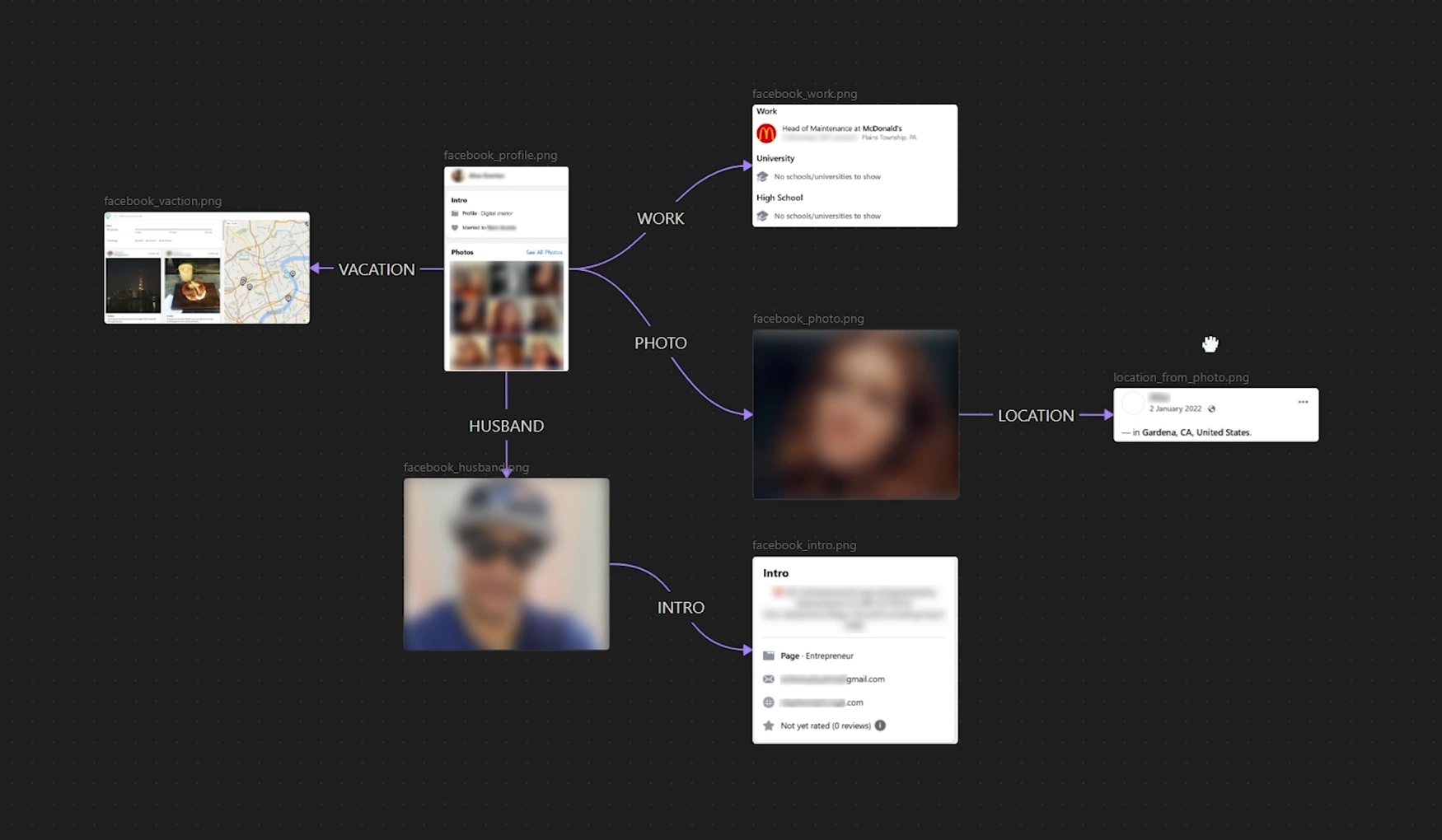
For anyone with an audience, repetition is especially dangerous. The same background, neighbourhood, gym, restaurant, office, driver, or assistant slowly turns into a navigation map of private life.
Old accounts#
Old accounts feel irrelevant because the person no longer uses them. But they may still hold old emails, phone numbers, photos, messages, archives, recovery addresses, and links to other profiles.
A forgotten forum login, an old domain, a test mailbox, or a decade-old cloud folder can reveal more context than a current public page.
Metadata and files#
Photos, documents, and screenshots can carry more information than intended: creation date, device, geo coordinates, author, file name, folder path, browser tabs, notifications, fragments of conversations.
Example: a business owner sends a PDF with edits. The file properties still show an employee's name, an internal folder structure, and the working title of the project. The document itself looks neutral. The metadata fills in the context.
Email, cloud storage, and messengers#
Email often becomes the hub of a digital life. It recovers access, stores documents, confirms payments, and links services.
Cloud storage and messengers add a second layer: files sit for years, links stay active, access isn't reviewed, chat participants change, old forwards never get cleaned up.
The problem isn't that a particular service is bad. The problem is the absence of rules: what may be stored, who has access, how requests are confirmed, when data is deleted.
Habits and repetition#
OPSEC is often broken not by data itself, but by patterns: repeated routes, predictable schedules, real-time posts, one password format, recurring communication channels, the habit of confirming urgent requests without verification.
Predictability is what makes a person easy to analyse.
Textbook cases#
Both mechanisms — connectivity and repetition — are easy to see in two well-known stories.
Strava, 2018. The fitness app published a global heatmap of user activity. Each individual run was harmless, but in the desert the glowing loops traced the perimeters of military bases that had never been publicly disclosed. The data wasn't secret — the sum of it was.
John McAfee, 2012. On the run from the authorities in Belize, McAfee gave an interview to Vice. The journalists posted a "we're with McAfee right now" photo — with exact GPS coordinates still sitting in the EXIF metadata. One file undid weeks of effort to stay hidden.
How OPSEC works in practice#
OPSEC starts with an inventory, not with installing another app.
You need to answer five questions:
- What are you protecting? Data, routes, deals, family, assets, access, reputation.
- Who are you protecting it from? A competitor, fraudster, hostile partner, ex-employee, journalist, blackmailer, casual observer.
- Which data is dangerous? Anything that helps identify, connect, predict, confirm, or impersonate.
- Where does the data appear? Social media, public registries, email, cloud storage, messengers, old websites, domains, leaks, documents.
- What can be reduced? Availability, connectivity, repetition, and the number of people with access.
The five questions are an adaptation of the classic five-step OPSEC process the military formalised and government methodologies still rely on: identify critical information → analyse threats → analyse vulnerabilities → assess risk → apply countermeasures. The military frame assumes a staff and formal procedures; what matters for a private person or a business is the sequence itself — first understand what you're protecting and from whom, and only then pick the tools.
What you're protecting#
You're not only protecting money, documents, and passwords. Often the context is more valuable: where you go, who you talk to, which assets you control, which deals you're preparing, which habits you repeat.
For a founder, add another layer — partners, negotiations, ownership structure, trusted people, corporate email, financial routes, employee access, and signals about decisions that haven't been made public yet.
For a public figure, the protected zone is addresses, family, personal contacts, trips, old accounts, and message archives — everything that reconstructs the surroundings.
Who you're protecting information from#
A threat doesn't always look like a hacker. More often it's a competitor, fraudster, ex-employee, hostile partner, journalist, blackmailer, or someone from a wider social circle.
The model shouldn't be built around one imaginary adversary. A sharper question is: who benefits if they collect enough data about you?
Which data can be used against you#
The main risk rarely sits with passports or passwords. It assembles itself out of mundane fragments. A post reveals a city. A restaurant photo reveals a route. An assistant's story confirms a meeting. An old domain points to a personal email. A breach dump shows where a password was reused. None of these replaces a real audit, but they make it clear where practical security ends and generic advice begins.
What belongs in a basic OPSEC perimeter#
OPSEC isn't about hiding a person completely. It's about reducing the number of points through which unnecessary information about them can be collected. A basic perimeter stands on seven elements: digital footprint control, personal data protection, account and access security, environment separation, communication rules, data minimisation, and regular review of public sources.
Digital footprint control#
A digital footprint covers old accounts, posts, comments, photos, breaches, domains, registries, corporate profiles, archived websites, and third-party mentions.
A basic self-check starts with searching for your own name, handles, and emails, plus breach aggregators like Have I Been Pwned to see whether your address appears in known dumps. To find the same handle across hundreds of platforms, analysts use Sherlock and WhatsMyName; deleted pages and old website versions live in the Wayback Machine. That's just the first layer — after that, you have to map the links between emails, domains, profiles, and contractors.
US- and EU-based clients usually start their data-broker cleanup at the same time: people-search sites like Spokeo, BeenVerified, Whitepages, and Intelius hold home addresses, relatives, and phone numbers, and almost all of them honour opt-out requests if you submit them properly. A single phone number can be unfolded into a profile, which is why it belongs in the same cleanup. The removal sequence itself — what to file, in what order, and what to do about the material that won't come down — is laid out in the guide on removing your personal information from the internet.
The risk isn't that information exists somewhere. The risk is that it falls into a readable picture: where you go, who you're connected to, which services you use, which assets you control, and where you're weak.
Personal data protection#
In OPSEC, "personal data" is a wider category than the usual "passport, phone, address" trio.
Any detail becomes personal data the moment it helps connect a person to actions, surroundings, assets, or habits: an old email, a backup number, a handle, a domain, a car, an assistant's name, a regular route.
Account and access security#
The password is only part of the picture. What matters is where 2FA is enabled, which devices have access, which apps are connected to accounts, who has admin rights, and which sessions are active right now.
Classic 2FA through SMS or TOTP codes is bypassed by AiTM phishing (Evilginx and friends): a fake domain proxies the login form to the real service and steals an already-valid session. For critical accounts — mailbox, banking, corporate consoles — you need passkeys or hardware keys (YubiKey, Google Titan), which AiTM cannot defeat.
One forgotten access path can expose messages, documents, ad accounts, CRM, cloud storage, or personal archives.
Separating environments#
A frequent mistake is mixing roles inside one digital perimeter.
A personal email is used for business. A work number is attached to social media. A public Telegram account overlaps with private chats. The same handle repeats across old profiles, forums, and work services.
That's how connectivity is created. The more overlaps exist, the easier it is to reconstruct a complete picture of life, business, and surroundings.
Communication rules#
Communication is often the main source of leaks.
A few simple rules go a long way:
- which topics never get discussed in ordinary messengers;
- which documents are never sent without a protected channel;
- who is allowed to request access;
- how urgent requests for transfers, files, or changed payment details are verified;
- where sensitive documents are stored and when they're deleted.
This isn't bureaucracy. It's protection against chaos under pressure.
Data minimisation#
Minimisation comes down to three habits: give a service only the personal data it actually needs to function; close contractor access the moment the work is done; and shift publication in time wherever urgency doesn't matter. That cuts the volume of material available for analysis, pressure, and social engineering.
Legal tools run in parallel. In the EU and UK, GDPR Article 17 — the right to erasure — lets you remove yourself from data brokers and search results. In California, the CCPA gives a comparable right to delete; similar regimes now exist in Canada (PIPEDA), Brazil (LGPD), and India (DPDPA). For removing other people's photos or stale content from Google's index, the DMCA takedown process is the working route. None of this is theoretical — it's a routine layer of OPSEC for HNW clients.
Common mistakes that break OPSEC#
An operational perimeter rarely fails because of one dramatic mistake. More often, it's a chain of small exposures.
Red flag: the same detail keeps showing up in different places — handle, email, number, route, background, domain, device, assistant. A detail like that connects separate parts of your life.
1. Publishing too much#
Travel photos, meetings, purchases, schedules, regular places, and everyday details all help build a profile. Real-time posts are especially dangerous.
Before publishing, ask one question: what here could be used against me, my family, my business, or my assets?
2. The same handle, email, and phone number everywhere#
The same handle on Telegram, Instagram, forums, and old services connects separate digital roles into one profile. An email or phone number used in dozens of registrations creates even more links. Exactly how one handle is used to reconstruct the remaining accounts and reach an email address is shown in the piece on finding someone by their username.
A person may believe they're running several separate environments. From the outside, those environments fold into one.
3. Geotags, documents, and screenshots#
Geotags, tickets, receipts, badges, browser tabs, notifications, file names, and reflections often reveal more than the visible content of the post.
Example: a founder posts a desk shot from a hotel. In the frame: a conference badge, part of an email on the screen, and the location. That's enough to deduce where the person is, who they may be meeting, and which project is being discussed.
4. Old accounts and forgotten services#
Forgotten mailboxes, cloud folders, forums, old social accounts, and test accounts may still hold documents, conversations, backups, old passwords, and contacts.
The longer an account is abandoned, the lower the control. For an outside observer, it becomes a convenient entry point.
5. Sensitive data in the wrong channels#
Documents, access credentials, agreements, financial data, and internal materials are routinely sent where it's convenient, not where it's safe.
Ordinary chats, work groups, and bots without storage rules are an obvious risk. A separate category is public AI services. On consumer tiers, ChatGPT, Claude, and Gemini may use what you type to train their models by default, unless you explicitly opt out in the privacy settings. AI note-takers (Otter, Fireflies, Granola, Read.ai) quietly join Zoom, Meet, and Teams calls and keep transcripts for months. For work material, you need an enterprise plan with an explicit training opt-out and audit logging, or local models running on hardware you control.
6. No rules for the team and inner circle#
A leak rarely comes from the data owner themselves. It usually comes from someone in the surroundings: an assistant, contractor, driver, family member, SMM lead, or employee. Household staff — a nanny, a driver, a housekeeper — are usually the least vetted part of that circle; how to check them and what to agree on about publishing is in the guide to vetting a nanny and household staff.
The same applies to the "invisible infrastructure" around the family: an Apple Watch sharing real-time location, a Tesla logging trip history, a teenager's TikTok showing the school uniform and neighbourhood, a smart speaker keeping years of voice queries, GPS metadata on family photos, parent chats spilling addresses. With HNW clients, the family perimeter is usually the softest one in the system — an attacker reaches the principal faster through a spouse, an assistant, or a teenager than through corporate IT.
Anyone with access to the schedule, documents, channels, trips, or communications needs clear rules. Otherwise the owner's personal discipline won't hold the perimeter on its own.
Operational risks by category#
| Category | Where the risk usually appears | What to check first |
|---|---|---|
| Founder / business owner | Personal–corporate overlap, capital and deal signals | Domains, emails, registries, contractors, lawyers, brokers, travel |
| Executive | Surroundings and personal perimeter | Assistants, calendar, messengers, family posts |
| Public figure | Content and old traces | Geotags, stories, old accounts, photo archives |
| Creator | Content production | Screenshots, backstage, ad accounts, clouds |
Founder / business owner#
A footprint review for a founder starts with a connection map: legal entities, domains, beneficial owners, employees, contractors, public interviews, court databases, old job ads, lawyers, brokers, trusted people. In English-speaking markets the same toolkit an adversary would use is open to anyone: Companies House for the UK, OpenCorporates for cross-border entity search, SEC EDGAR for US public filings, PACER and the free CourtListener for federal court records, OpenSanctions for sanctions and PEP screening, and the ICIJ Offshore Leaks Database for offshore structures.
Jurisdictional transparency varies wildly, and that's part of the OPSEC decision before a company is incorporated. The UK and most US states publish directors, addresses, and (in the UK) beneficial owners. Delaware LLCs, UAE free zones, and many Singapore entities don't. Where a deal is structured is itself a signal.
On top of the connection map sit the capital and deal signals: travel, industry events, public subscriptions, comments in closed communities, overlap with partners.
Risk shows up when personal and corporate are mixed: work documents living in a personal cloud, a domain registered to a private email, ad-account access still held by former contractors, a congratulatory post about a partner's closed deal turning into a launchpad for fraud.
First places to check:
- domains and the email addresses they're registered to;
- public company data, beneficial owners, and visible relationships;
- old job ads, websites, presentations, interviews, and PDFs;
- contractor access to ad accounts, CRM systems, and cloud storage;
- personal accounts that overlap with corporate tasks;
- capital signals: travel, public subscriptions, industry events.
From practice (details anonymised): for one founder client, in a single working day and from open sources alone — no closed databases, no paid tools — we mapped the home address, the children's school, a spouse's training schedule, and direct contacts for the family lawyers. That's the starting point from which phishing, blackmail, or coercion is usually built.
Executive#
For an executive, the weak point is usually the surroundings: assistants, family, calendar, routes, private events, personal devices.
A single screenshot from a work call can reveal a project name, participants, an internal interface, or part of a document. That's enough to prepare a more convincing attack. Sumsub reported a roughly tenfold rise in deepfake incidents from 2022 to 2023, and the FBI IC3 report for 2023 recorded nearly $2.9B in losses from BEC and CEO-fraud in that year alone. Thirty seconds of public video is enough to clone an executive's voice — and the CFO gets a call "from the CEO" asking to approve an urgent payment.
Public figure#
Public figures consistently underestimate the cumulative effect. One post is harmless. Hundreds of posts add up to addresses, schedule, routes, surroundings, and sensitive topics.
OPSEC here applies to the archive as much as to future posts: new content is just the visible layer, sitting on top of years of material that's already public.
One layer of that archive is your face: press photos, conference coverage, and shots other people publish. The practical side of it is in the piece on how to block face search — a map of the indexes, verified removal forms, and an honest account of which measures pay off and which only look like protection.
Creator#
For a creator, risk often follows the production workflow: desk, notifications, backstage content, unboxings, trips, gear, assistants, ad accounts.
Old accounts, recovery emails, clouds, and brand-collaboration platforms are especially dangerous. They get reviewed rarely, but they often lead back to active channels.
OPSEC for crypto holders#
Nowhere is the term OPSEC used more actively than in crypto — for good reason. A blockchain changes the baseline assumption: every transaction is public and stays public forever. Address pseudonymity is not anonymity. The moment one address is tied to an identity, its entire history — and everything connected to it — becomes readable in retrospect.
The person-to-address link is usually created by mundane things: an ENS name that matches a handle, a donation address in a profile, an NFT avatar bought from the main wallet, a portfolio screenshot shared "just with friends", a withdrawal to an exchange account that passed KYC. From there, on-chain analytics does the rest — the same link graphs as classic OSINT, except with exact amounts and timestamps.
Crypto OPSEC also has a dimension the other perimeters don't: physical security. Publicly signalling the size of your holdings turns a holder into a target for the "wrench attack" — why break a wallet's cryptography when the owner can be coerced into sending the funds themselves. The running list of documented physical attacks on holders has been maintained for years and keeps growing.
The baseline rules:
- don't link a public handle to addresses: separate addresses for donations and public payments, with no transfers to or from the main wallet;
- never show the size of your portfolio — not in a screenshot, not "roughly, in conversation";
- keep seed phrases out of clouds, notes apps, photos, and email; keep serious amounts on a hardware wallet;
- run a separate "hot" environment for DeFi and experiments, isolated from the main one;
- remember that buying through a KYC exchange has already tied an address to your identity — design your environments with that in mind.
How to improve OPSEC without paranoia#
OPSEC doesn't require giving up social media, messengers, public activity, or a normal life. You can start with a practical review. For a step-by-step build for executives and their families, see the companion article OPSEC in Practice.
1. Define critical data#
Write down what shouldn't be exposed without control.
For a founder, that usually covers negotiations, ownership structure, travel routes, access to corporate services, trusted people, personal contacts, and financial documents.
If there's an audience involved, addresses, family connections, private photos, old accounts, personal numbers, and regular locations get a separate line.
The goal isn't to hide everything. It's to see in advance what, sitting in the open, could work against you.
2. Separate personal, work, and public environments#
Each environment should have a clear purpose.
| Environment | Purpose | What shouldn't be mixed in |
|---|---|---|
| Personal | Family, close circle, private documents | Public channels and work registrations |
| Work | Team, partners, contractors | Personal cloud, personal email, family accounts |
| Public | Audience, media, personal brand | Primary phone number, addresses, private chats, real routes |
The fewer overlaps, the harder it is to assemble a complete picture.
3. Review old accounts, emails, and clouds#
Find forgotten profiles, old mailboxes, forums, clouds, domains, and services where documents, photos, messages, recovery numbers, or old passwords may still be sitting.
Check:
- whether the account is still accessible;
- whether 2FA is enabled;
- which devices and apps are connected;
- whether active file links exist;
- whether old data can be deleted or anonymised.
4. Limit publications and metadata#
Before publishing a photo, screenshot, or document, check what's visible beyond the main content.
Pay particular attention to geotags, windows, reflections, badges, tickets, browser tabs, file names, notifications, addresses, room numbers, and project names.
5. Set communication rules#
Decide in advance where sensitive topics can be discussed, how documents are sent, who can request access, and how urgent requests are verified.
For a business, that means a short protocol for the team and assistants. For a private setting, a separate protocol: what doesn't get forwarded, where information is stored, who confirms requests, and when material is deleted.
6. Run a digital footprint audit#
Check what's already visible about you in open sources: search engines, old posts, social media, domains, archived websites, breach data, registries, photos, and mentions in documents. Breach data is a job of its own — how to check where your data has surfaced, by email, phone, and password, is covered in a neighbouring guide.
Self-checks are useful, but they have a limit: people judge their own data by intention. An outside observer judges it by how the pieces connect.
What an OPSEC audit covers#
An OPSEC audit isn't a quick password check, and it isn't the search for one specific "leak". It's an analysis of the external perimeter: what data is already accessible, how the pieces connect, and which risk scenarios fall out of those connections.
When I run an external-perimeter audit, the reference point is different: not how the owner intended to present themselves, but what can actually be found in open sources and breach data, correlated, and used against them without ever touching their devices.
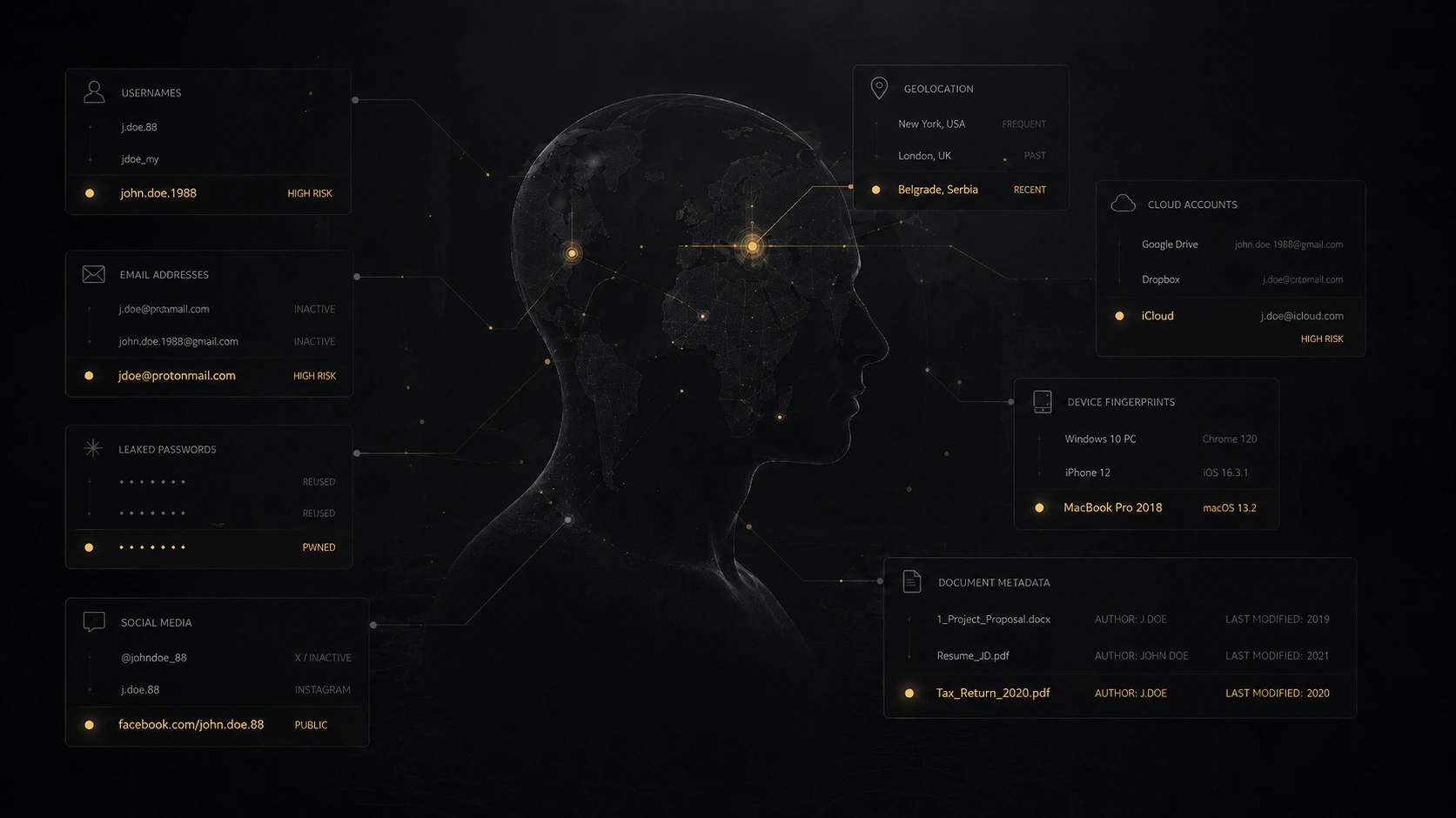
A typical review covers:
- public profiles, old accounts, handles, emails, and phone numbers;
- domains, websites, archived pages, PDFs, presentations, and metadata;
- mentions in search results, social media, registries, media, and documents;
- breaches, repeated identifiers, and links between services;
- cloud storage, active links, contractor access, and third-party apps;
- messengers, communication channels, recovery emails, and devices;
- family, public, work, and corporate environments;
- regular routes, real-time posts, and recurring behavioural patterns.
The output isn't a long list of links. The point is different: which data creates risk, who could use it, and what needs to be closed first. One technical vector of that risk is surveillance through the device itself: how to check for it is covered in the guide on how to check your phone for spyware and tapping.
For a founder, the deliverable is a connection map between emails, domains, legal entities, contractors, and trusted people, together with accumulated signals about capital, deals, and travel. For a public figure, the focus shifts: how content, geography, and forgotten accounts trace back to the private perimeter.
The same lens — what's actually visible about a person or company from the outside — is what we apply in open-source background checks.
When to run an OPSEC audit#
A digital footprint audit pays off long before a hack — while a mistake is still cheap to fix and hasn't gone public or irreversible.
An audit matters in particular:
- before a public launch of a project, fund, channel, or personal brand;
- before a major deal, negotiation, or investment round;
- after a hack, leak, or suspicious activity;
- when public profile, capital, conflict, or media attention is rising;
- when working with sensitive data, client databases, legal materials, and financial documents.
Before a public launch#
Before launching anything public, check what can already be found about the owners, team, domains, infrastructure, and connections.
Common pattern: the product hasn't shipped yet, but old accounts, domain registrations, open profiles, and email addresses already make it obvious who's behind it and through whom the key people can be reached.
Before a deal or negotiation#
Before a transaction, it pays to understand what the other side can collect: old conflicts, court records, breach data, personal connections, the team's digital footprint, public statements. The mirror task is vetting the other side yourself — the free registry checks and the full process for buying a company are in due diligence on a company. If the other side is a Russian company, the registries are different — see how to check a Russian company and, if it looks unusually new and unusually accommodating, the Russian shell company red flags.
Sometimes a negotiating position weakens not because of the terms, but because of information someone found in advance.
After a leak or compromise#
If a mailbox, Telegram, cloud, CRM, or corporate account has been compromised — or there are signs of someone else's access — changing a password isn't enough.
You have to understand what data may have been exposed, which accounts are linked together, where active sessions remain, and whether the same entry can be repeated through another path.
When publicity or conflict rises#
Risk grows after public appearances, fundraising, partner disputes, court cases, divorce, large transactions, media coverage, or rapid audience growth.
The higher the value of reputation, assets, and decisions, the more it matters to understand what traces have already accumulated.
Personal OPSEC checklist: a five-minute self-check#
This express check doesn't replace an audit, but it shows whether your external perimeter has systemic weak spots.
Run through the list:
- Is the same handle, email, or phone number used across public and private platforms?
- Are your personal Telegram, Instagram, or WhatsApp tied to the corporate perimeter — work email, domains, ad accounts?
- Do former contractors, assistants, or employees still have active access to CRM, ad accounts, cloud storage, or corporate email?
- Do you or the people around you post in real time — with location, route, badge, internal interface, or documents in the background?
- Are work domains, accounts, or services registered to a personal email without 2FA?
- Can you list, in five minutes, every cloud, forum, and old service where your documents and recovery addresses still live?
- Is there a rule that urgent requests — transfers, files, changed payment details — must be verified through an independent channel?
- Do your family, assistant, and team know what not to publish, forward, or confirm without your sign-off?
Next step#
Operational security gives you the frame: what to protect, from whom, and why. But the risk usually starts with something simple.
A forgotten account. The same handle everywhere. Real-time geolocation. A screenshot carrying more than intended. A document sent through an ordinary chat. A personal email handling work. Contractor access that should have been closed long ago. Each of these looks ordinary until it merges into one connected profile.
The logical next read is the practical follow-up: 10 digital hygiene mistakes that expose you. It walks through the everyday actions that expose routes, relationships, access, documents, and private infrastructure long before any technical incident.
FAQ#
What is OPSEC in simple terms?#
Operational security is a method for protecting information about you, your actions, plans, relationships, and habits. In plain English, it means not leaving unnecessary traces and not letting outsiders collect more about you than they should.
How is OPSEC different from cybersecurity and digital hygiene?#
Cybersecurity answers "can someone get access to the system?" Digital hygiene closes the basic mistakes in handling accounts and devices. OPSEC answers a different question: "what can someone understand without access?" It works at the level of behaviour, publications, routes, communications, and surroundings. Strong passwords and 2FA won't help if the person is themselves revealing addresses, connections, documents, and habits through open data.
Do I need a VPN for OPSEC?#
A VPN solves a narrow problem: it hides your real IP and encrypts traffic between your device and the VPN server. That doesn't make you invisible in OPSEC terms — social media, metadata, handle reuse, breach data from old accounts, and your behaviour on public platforms all stay open. A VPN is a useful tool in specific situations (public Wi-Fi, geo-restricted resources, separating work and personal traffic), not a substitute for footprint work.
What does OPSEC mean in crypto?#
The same discipline applied to crypto assets: preventing anyone from linking your identity to your addresses and the size of your holdings. A blockchain is public forever, so pseudonymity only lasts until the first link — an ENS name, a donation from the main wallet, a withdrawal through a KYC exchange. The baseline: separate addresses by role, never display the portfolio, keep seed phrases out of cloud storage, and take the physical risk seriously — documented cases of coercion against holders run into the hundreds.
What should I do about work documents in AI services?#
On consumer tiers, ChatGPT, Claude, and Gemini may use what you enter to train their models by default, unless you opt out in the settings. AI note-takers like Otter, Fireflies, and Granola quietly join Zoom, Meet, and Teams calls and store transcripts for months. For work material, use an enterprise plan with an explicit training opt-out and audit logging, a separate corporate account, or local models on infrastructure you control. Pasting contracts, deal terms, financial data, or client lists into a public AI service is the same as sending them to an ordinary chat with no storage rules.
How often should I run an OPSEC audit?#
The baseline cadence is once every six to twelve months. An off-cycle audit makes sense around triggers: before a public launch of a project or fund, before a major deal or investment round, after a hack or suspicious activity, when public profile and media attention rise, during a partner conflict, divorce, or court case. In those moments the external perimeter changes faster than the person notices.
Can I do OPSEC on my own?#
The baseline — yes. Review public profiles, strip unnecessary data, separate personal and work channels, enable 2FA on critical accounts, close old access, inventory clouds and mailboxes. An external audit becomes necessary when the task is no longer "fix individual settings", but "see the connections between data points the way an observer sees them, and understand which attack scenarios fall out of that picture".
Does OPSEC mean hiding everything?#
No. OPSEC isn't about disappearing from public life. The point is to separate visibility from vulnerability. You can run a business, speak publicly, build a personal brand, and stay visible without exposing private infrastructure, routes, family details, or work access.
In short: OPSEC is control, not secrecy#
The reminder I give clients regularly: OPSEC rarely means leaving the internet. Far more often, it means control — what traces you leave and how those traces connect.
For a founder or anyone with a public profile, risk rarely arrives in one fact. It appears when travel, social media, companies, old posts, photos, contacts, communication habits, and access points merge into a single picture.
Good operational security doesn't get in the way of working, meeting people, speaking publicly, negotiating, or building a personal brand. It removes the unnecessary predictability and shrinks the number of points through which someone can reach you.