There is no "secret code" that reveals a tap — *#21# checks call forwarding, not a bug. What actually works: first decide who could be watching you (a jealous partner, a competitor with a budget, or your carrier — three different checks), then pick the right tool. Consumer stalkerware is caught by antivirus and a manual check of device-admin apps; mercenary spyware like Pegasus, only by forensics (iShutdown, MVT, iVerify) and Apple's threat notifications; carrier-level interception and fake cell towers can't be detected from the phone at all. And remove what you find carefully — sometimes that's a signal to whoever is watching.
The search "how to check my phone for spyware" almost always starts with a specific trigger: someone knew something they shouldn't have; there's a click on the line; after meeting a certain person the phone started acting on its own. The first results offer a "secret code" and a dozen signs like "the case gets warm." The problem is that almost all of it is either a myth or a half-truth, and the methods that actually work are never mentioned in mass-market articles.
An honest frame first — it saves both nerves and money. From the phone you can reliably detect software surveillance — apps someone installed or sent to you. You cannot detect interception on the carrier's side or at the radio-network level. Everything else is detail inside those two boundaries. What follows is the order I use in practice, with concrete tools and the exact places where ordinary guides mislead you.
Start here: who is actually watching you#
The main mistake in nearly every article on this topic is giving one set of tips for every case, as if a jealous spouse and a state intelligence agency used the same tools. They don't, and the checks differ. Before you check anything, answer one question: who could realistically be interested in you, and with what budget? The answer decides the whole method. This is the first principle of operational security — start not with a tool, but with a threat model.
There are almost always three classes of adversary.
Domestic surveillance — stalkerware. The most common and most underestimated case. These are apps sold legally as "parental control" or "anti-theft" (mSpy, Hoverwatch, and dozens of clones) that someone installs by hand after getting access to your unlocked phone: a partner, a relative, a jealous ex, sometimes an employer. They quietly forward messages, calls, location, and microphone recordings. The key point: installation requires physical access to the device, which narrows the list of suspects. And the good news — this class is the easiest to detect.
Targeted surveillance — mercenary spyware. Pegasus by NSO Group, Predator, Reign. A different order of weapon: infection often happens with no action from you at all (0-click, through a single incoming message), costs a lot, and is used against specific people. This used to be seen as a problem for journalists and activists. Not anymore. According to iVerify, in December 2024 alone Pegasus turned up on 11 of 18,000 scanned devices, and the victims of the new detections were mostly business executives in finance, real estate, and logistics — the people running large deals and holding sensitive information. Antivirus won't catch this; you need forensics.
Network interception — carrier, lawful intercept, fake towers. Wiretapping on the telecom infrastructure. Understand this immediately: it cannot be detected from your device by any means — not by a code, not by an app, not "from clicks on the line." Why that is, and what to do about it, is a separate conversation below.
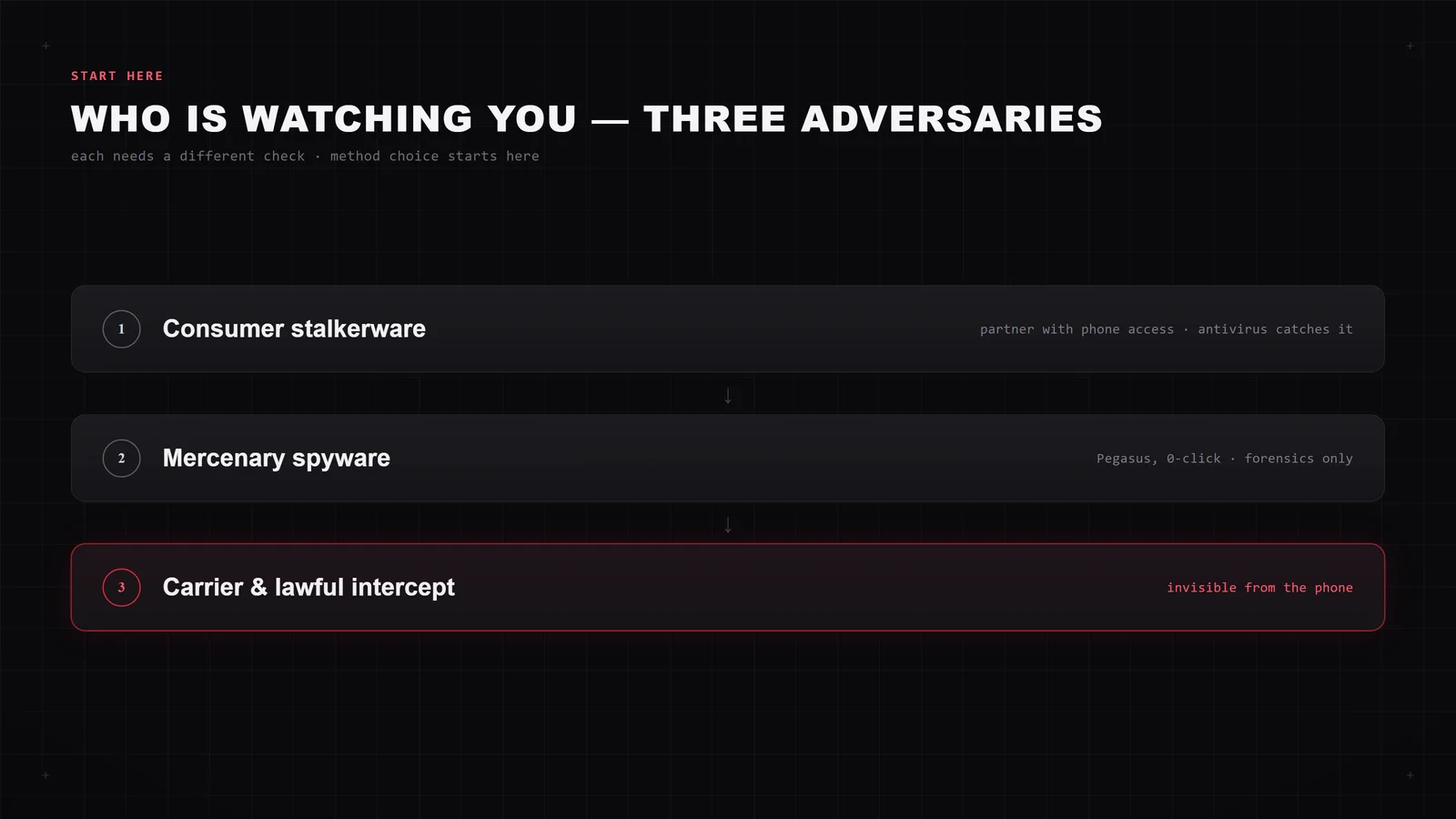
The rest of the article is organized around these three branches. If you read only one, read the one matching your real adversary, not the scariest one.
Signs you shouldn't trust#
"The phone gets warm, the battery drains fast, there's an echo on the line, you get texts with strange symbols" — this list travels from article to article as a way to detect tapping. On its own, none of these is diagnostic, and here's why.
Modern stalkerware is specifically optimized not to give itself away: it conserves battery and data, or it would be noticed. Heat and fast drain are almost always a degraded battery, background apps, or weak signal — not a bug. "Echo and clicks" on a digital cellular connection have nothing to do with interception: carrier-level tapping produces no audible artifacts — a common misconception left over from the analog-telephone era.
What matters is not a single symptom but a cluster of sharp changes appearing at once: a sudden spike in mobile data plus an unfamiliar app you didn't install plus an unknown configuration profile or VPN in settings. And even that is not a verdict — only a reason to move on to the real checks below. One sign by itself means nothing.
The one "sign" worth trusting is the privacy indicator: a dot in the status bar when the microphone or camera is active. On Android 12 and later it's green; on iPhone (iOS 14+) orange means microphone, green means camera. If the dot lights up when you're using neither, that's a concrete signal you can act on.
Is there a code to check if your phone is tapped? The *#21# myth#
The most persistent myth of the topic: dial *#21# and you'll learn whether you're being tapped. It's false, and it matters what these codes actually do — because a "clean" result creates a false sense of safety.
*#21#, *#62#, and the like are USSD codes that interrogate call forwarding, standard commands for managing supplementary services on GSM networks. Here's what they show:
*#21#— the state of unconditional forwarding: whether all your calls and messages go to another number. If you never enabled it and the code shows nothing, there's no forwarding.*#62#— forwarding when the phone or network is unreachable. This very often holds the number of your carrier's voicemail — a default setting, not surveillance. An unfamiliar carrier number here is normal.*#67#— forwarding when the line is busy.##002#— clears all forwarding at once.
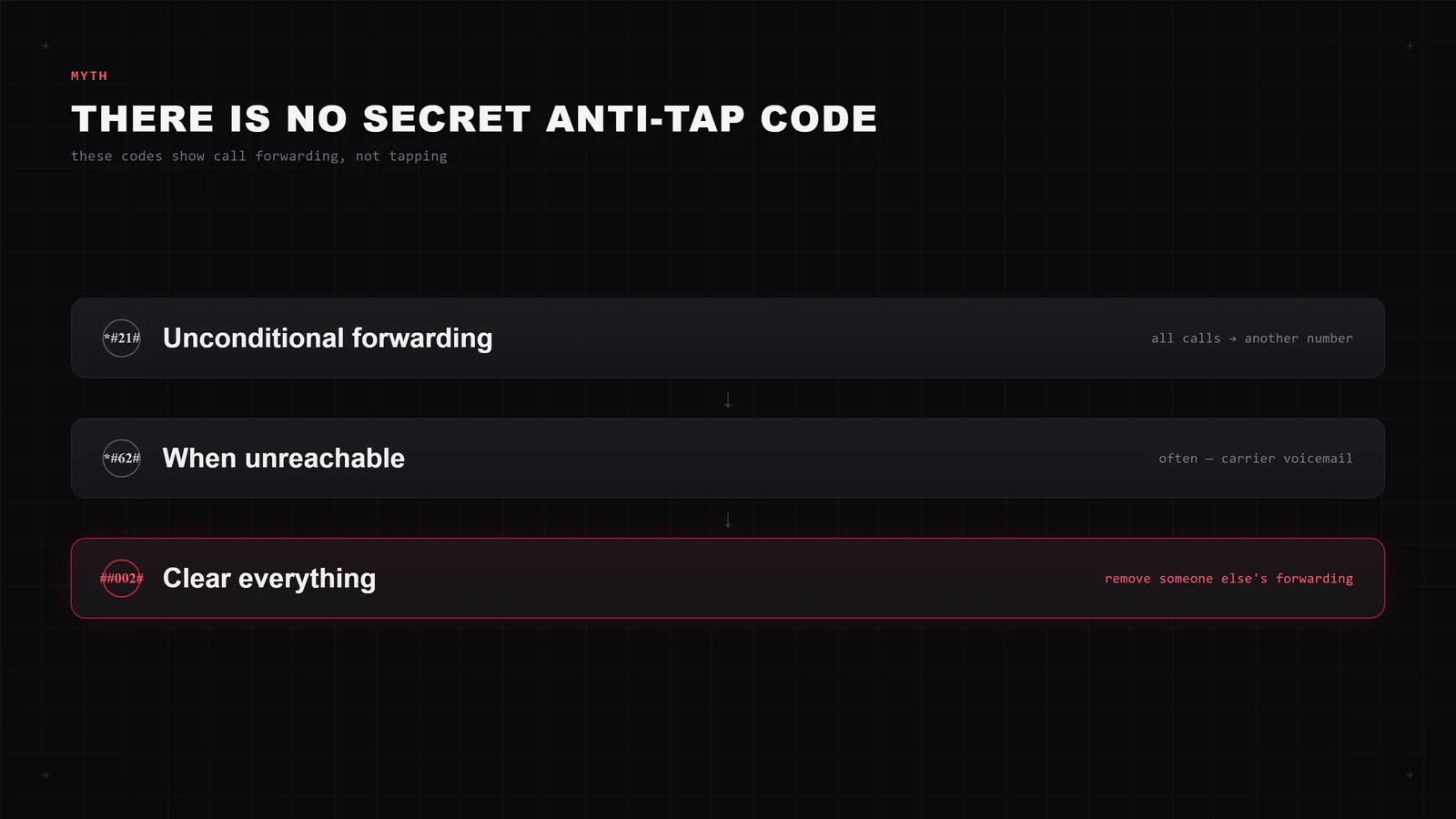
Why this isn't about tapping: real interception of a conversation happens either on the carrier's side (which forwarding never reveals) or through a program on the device itself (which these codes also don't reflect). Call forwarding is a separate, fairly crude vector: to enable it, an attacker again needs access to your phone or to your account with the carrier.
So the codes do have a practical use — just not the one you're promised. Dial ##002# to clear any forwarding someone else may have set — that's sensible hygiene. But don't treat "the code came back clean" as "there's no surveillance." It's a check of one narrow door, not the whole house.
While we're at it, another favorite of mass-market articles — *#*#4636#*#* and advice like "go into text-to-speech and turn off anonymous reports." The first opens an engineering menu with technical stats and has nothing to do with tapping; the second is just a meaningless ritual. Neither diagnoses anything.
How to check Android: indicators, device-admin, antivirus#
Android is the main platform for consumer stalkerware, because the system allows installing apps outside the store and granting them broad permissions. The check goes in escalating steps.
Step 1. Microphone and camera access log#
Open Settings → Privacy → Privacy Dashboard (Android 12+). It shows which apps accessed the microphone, camera, and location, and when, over the last 24 hours. An app reaching for the microphone at three in the morning, when it's not a recorder or a messenger, is the first candidate for scrutiny. Menu paths differ a little across Samsung, Xiaomi, and stock Android — look for "Privacy Dashboard" or "App permissions."
Step 2. Device-admin apps#
This is the key step mass-market guides skip. Stalkerware almost always requests device administrator rights — they make it hard to remove and give access to deep functions. Check: Settings → Apps → Special access → Device admin apps (or Settings → Security → Device administrators). Anything unfamiliar masquerading as "System Service," "Device Health," "Sync," or "Update" is suspect.
While you're there, check two dangerous access types that spyware latches onto:
- Accessibility — through it an app reads screen contents and intercepts input. Legitimate apps here are usually one or two; disable everything else.
- Display over other apps and Notification access — also frequent footholds.
Step 3. Removal and Safe Mode#
An app with admin rights won't uninstall the normal way — first revoke those rights (in the same menu), then remove it. If it resists or hides its icon, boot the phone into Safe Mode: it disables all third-party apps, so nothing can block the removal.
Step 4. Antivirus — but not just any#
Here specifics matter, not a random list of "anti-spy" apps from the store. In 2025 the independent lab AV-Comparatives tested how well antivirus products actually catch stalkerware — here are measurable numbers instead of promises (17 stalkerware apps, Android 15 on a Samsung Galaxy A36):
| Antivirus | Stalkerware detection (2025) |
|---|---|
| Malwarebytes | 100% |
| Bitdefender / ESET / Kaspersky / McAfee | 94% |
| Avast / Avira / F-Secure | 88% |
| Norton / Sophos | 82% |
| Google Play Protect | 53% |
The main takeaway: built-in Play Protect misses nearly half of stalkerware, so you can't rely on it alone. Install an engine proven in an independent test, and run a full scan rather than a quick one.
How to check an iPhone for Pegasus: from Apple's alert to MVT#
There's almost no consumer stalkerware on iPhone — the closed system won't let someone quietly install an app without your Apple ID and physical access. But the iPhone is the main target of mercenary spyware like Pegasus, and this is exactly where we have tools that no mass-market guide mentions. We go from simple to forensic.
Level 1. Built-in checks#
- App Privacy Report (Settings → Privacy & Security → App Privacy Report) — the analog of the Android dashboard: who accessed which sensors and when.
- Safety Check — quickly shows who your data and access are shared with, and lets you revoke it all at once. Useful if a close person may have gotten into your Apple ID.
- Configuration profiles (Settings → General → VPN & Device Management). If you never installed a corporate profile but one is there, that's a warning sign.
Level 2. Apple threat notifications#
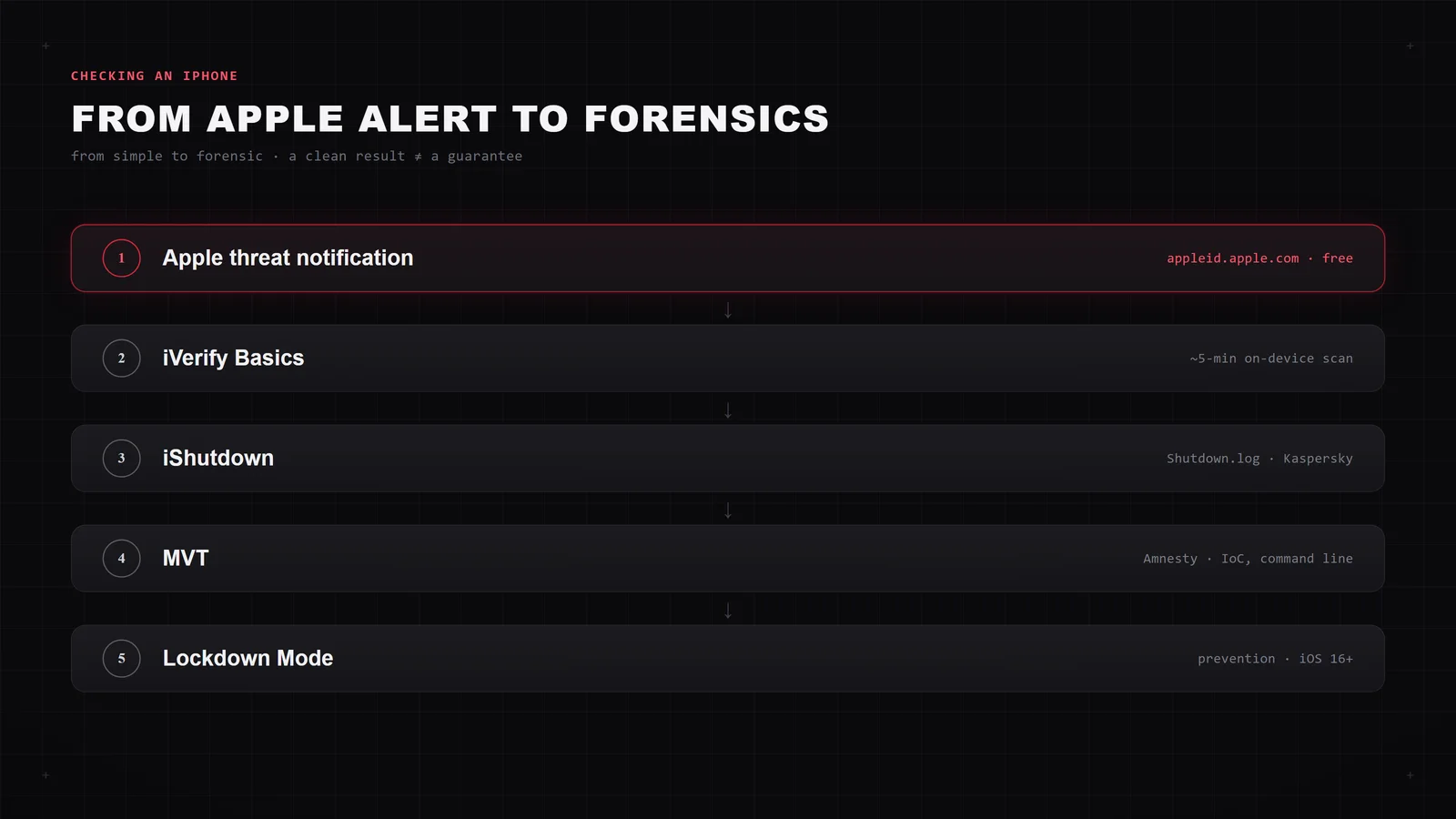
Apple sends threat notifications to those whose account, in its assessment, has been attacked by mercenary spyware. The notification arrives via iMessage and the email tied to your Apple ID, and is echoed by a banner when you sign in at appleid.apple.com. The mechanism is tied to the Apple ID, not the country, and Apple deliberately doesn't attribute notifications to specific regions or attackers. Just sign in at appleid.apple.com and check — it's free and requires installing nothing.
Level 3. Forensics on your own#
The interesting part. You can check an iPhone for traces of Pegasus yourself — here are three tools in ascending complexity.
iVerify Basics. An app that runs a full on-device threat hunt in about five minutes: it analyzes diagnostic, shutdown, and crash logs with heuristics and machine-learning models. On suspicion, it lets you submit the data for deeper forensic analysis. The app costs a token amount — on the order of a dollar.
iShutdown (Kaspersky). The "reboot" method, discovered by Kaspersky researchers. As Kaspersky showed, Pegasus, Predator, and Reign leave traces in the system Shutdown.log inside the iPhone's diagnostic archive: infection interferes with the normal termination of processes at reboot, and it's visible in the log. The order is:
- Reboot the iPhone several times (the log is appended on each reboot).
- Capture the sysdiagnose diagnostic archive.
- Run the archive through the three iShutdown Python scripts Kaspersky published on GitHub — they extract and parse
Shutdown.log. The scripts run on macOS, Windows, and Linux.
This is the easiest entry into forensics: no jailbreak needed, just a computer and patience.
MVT (Mobile Verification Toolkit). The gold standard. An open tool by Amnesty International Security Lab that analyzes an encrypted iPhone backup or sysdiagnose against Amnesty's indicators of compromise and detects Pegasus and Predator. It runs from the command line — that's "advanced user or specialist" territory. For those who dislike the command line, iMazing Spyware Analyzer is a graphical wrapper over the same logic.
An honest note about all of these: a clean result means "no traces of known threats found," not "guaranteed clean." Indicators catch what researchers have already described. That's why prevention exists separately for the at-risk group — more on that at the end.
Advanced: checking the phone's traffic from outside#
There's a method that checks the phone from the outside and is therefore invisible to any software on the device itself — an important property, because advanced stalkerware can notice it's being looked for and go quiet.
The setup is a small Raspberry Pi box between your router and the phone: all of the device's Wi-Fi traffic passes through it and is checked in real time against indicators of known spyware — command servers, suspicious domains, anomalous connections. Because the analyzer runs outside the phone, no program on it suspects the check or can evade it.
The best-known tool of this kind, Kaspersky's TinyCheck, is no longer available: its official GitHub repository has been taken down (checked September 2026). Its original developer maintains a fork, SpyGuard, whose stalkerware indicators are curated by the French anti-cyberviolence association ECHAP. For deeper, consent-based forensics there is the PiRogue Tool Suite.
The downside is obvious — you need a Raspberry Pi and some willingness to fiddle with setup; instructions are in the SpyGuard repository. It's a good option for a one-off honest check without installing anything on the phone, or a task for a trusted IT specialist. For an executive's household, where several devices are under suspicion at once, this is often the most practical path.
Surveillance isn't always tapping#
It's worth separating two things the phrase "tapping and surveillance" merges. Sometimes a person isn't being listened to but tracked — and that's checked differently.
- "Always" location permission. Settings → Location: revoke "always" access from everything except maps and navigation (they're fine with "while using"). An app with background location is a tracker, even if it records no audio.
- Shared location. In Apple's Find My and Google's Find My Device, check whether you're sharing your location with someone — it's enabled with a couple of taps and easily forgotten.
- A shared account. If your Google or Apple account was set up on someone else's device too, that person sees your location history. Change the password and review the device list in the account.
- Hidden trackers (AirTag and clones). iOS and Android warn you when an "unknown" tracker is moving with you. Don't ignore that alert — check your bag, car, and outerwear.
None of these vectors involves listening to conversations — it's a separate layer, and it's closed off separately.
What you can't see from the phone: carrier, lawful intercept, fake towers#
Now the most honest and least popular part, which mass-market articles pass over in silence because it doesn't sell a "secret code." There are three things that cannot be detected from the phone by any means:
- Carrier interception and lawful intercept. Interception happens on the carrier's infrastructure, off your device. No logs, no traffic, no "noise" remain on the phone. No app and no code will show it — and any service promising otherwise is selling a myth.
- IMSI catcher (fake base station, StingRay). A device that pretends to be a tower and intercepts nearby traffic. In theory it's detected by apps like SnoopSnitch (by SRLabs) or AIMSICD, but they need a rooted phone with a Qualcomm chipset and access to low-level radio data. On modern iPhones and Android that access is closed by the manufacturers, and rooting itself weakens protection more than it grants visibility. In practice, it's unusable for an ordinary user.
- SS7 network-level attacks — entirely out of a user's reach.
The conclusion isn't "relax" but "change the plane of defense." If your threat model includes the carrier or the state, on-device diagnostics are useless — something else works: don't hold sensitive conversations over the ordinary cellular network, and move to end-to-end encrypted messengers (Signal, Threema). Encryption devalues channel interception: even captured traffic stays unreadable. That's the line between what an app can fix and what only behavior can.
You found surveillance — what next (and why not to rush to delete)#
It seems logical: found a spy program — delete it, done. In one scenario that's dangerous, and almost no one warns about it.
First, assess the risk of escalation. If the stalkerware could have been installed by someone capable of harming you (a partner in conflict, a stalker), then removal is a signal to them: the app stops sending data, and they realize they've been discovered. Per organizations working with victims of stalking (Coalition Against Stalkerware, "Information for survivors"), the moment of removal is often what triggers a spike in aggression. So the order is:
- Don't touch the phone right away. Think through your safety first. If the situation calls for it, reach out for help — a lawyer, a trusted person — from a different, known-clean device, not the one under suspicion.
- Preserve evidence before any changes: screenshots of the suspicious apps, their permissions, the settings. For anything with legal weight, agree the way you capture it with a lawyer.
- Cleanup. Consumer stalkerware: revoke device-admin rights → uninstall (see the Android section). More reliable is a full factory reset followed by manually reinstalling apps only from the official store. One caveat: do not restore data from a backup made after the infection — you'll bring the spy back with it. For mercenary spyware a reset isn't always enough; against a real Pegasus threat, people replace the device.
- Rotate passwords — from a clean device. After cleanup, change passwords and end active sessions not from the formerly infected phone but from a guaranteed-clean one. Otherwise the new password leaks through the same channel. Turn on two-factor authentication — a hardware key or passkey is better than SMS, because SMS is intercepted via SIM swap. With your carrier, set a port-out PIN / Number Lock so a hijacked number opens nothing. If an account has already been taken over and you can't get back in on your own, we can help you regain control of the account.
- Check the fallout. While the phone was under someone's control, your data could have leaked. It's worth checking whether your accounts turn up in breaches and confirming no new SIM cards or credit lines were opened in your name.
If you're in the at-risk group: Lockdown Mode and Apple alerts#
For public figures, executives of large businesses, and anyone with a motivated, well-resourced opponent, defense is built not on a one-off check but on continuously shrinking the attack surface.
Lockdown Mode on iPhone (iOS 16+, Settings → Privacy & Security → Lockdown Mode) sharply restricts exactly the vectors mercenary spyware uses to get in: message attachments, some web technologies, incoming invitations and connections. You pay for it in convenience, but for a real threat model the trade is worth it. On iPhone 17 and iPhone Air (September 2025) there's also hardware protection, Memory Integrity Enforcement, on the A19 chips — Apple calls it the industry's first always-on memory-safety protection, aimed precisely at the memory flaws Pegasus relies on. Not an absolute shield, but a sharp increase in the cost of an attack.
This is where what you can do alone ends and work from the adversary's side begins — where a specialist looks at your perimeter the way someone planning to attack it would. What that looks like systematically is in the breakdown of OPSEC for executives. And if you need devices and communications checked professionally, with equipment and without guesswork, that's what we do: confidentially and without fuss.
FAQ#
What code checks a phone for tapping?#
None. *#21# and *#62# show call forwarding, not tapping: *#21# is unconditional forwarding, *#62# is forwarding when unreachable (which often holds your carrier's voicemail by default). You can clear any forwarding someone else set with ##002#, but a "clean" result doesn't mean there's no surveillance — real interception happens on the carrier's side or through a program on the device, and these codes don't reveal it.
Can I check a phone for spyware for free?#
Yes. On Android — the Privacy Dashboard, the microphone/camera access indicator, a check of device-admin apps, and a free antivirus. On iPhone — App Privacy Report, Safety Check, Apple's threat notifications at appleid.apple.com, and Kaspersky's free iShutdown scripts for log analysis. All the serious forensic tools (MVT, SpyGuard, iShutdown) are free and open source.
How do I know if someone is watching me through my phone?#
First identify the adversary: consumer spyware (installed by someone close with access to the phone) is caught by antivirus and a manual check of device-admin rights; mercenary spyware like Pegasus, only by forensics and Apple's alerts; carrier interception and fake towers can't be detected from the phone at all. "It gets warm and the battery drains" is not a sign on its own — what matters is a cluster of sharp changes plus new unfamiliar apps or configuration profiles.
Does a factory reset remove spyware?#
For consumer stalkerware — yes, but don't restore data from a backup made after the infection, and change your passwords right away from a different, clean device. For mercenary spyware a reset isn't always enough — against a real threat, people replace the device itself. And remember: a reset doesn't stop carrier interception; it concerns only the device, not the communication channel.
Can I check an iPhone for Pegasus myself?#
Yes, in ascending complexity: check Apple's threat notifications at appleid.apple.com; run iVerify Basics (about a five-minute scan); capture the sysdiagnose diagnostic archive after several reboots and inspect Shutdown.log with the iShutdown scripts; for deep analysis, use MVT by Amnesty International against its indicators of compromise. A clean result means "no traces of known threats found," not "guaranteed clean."