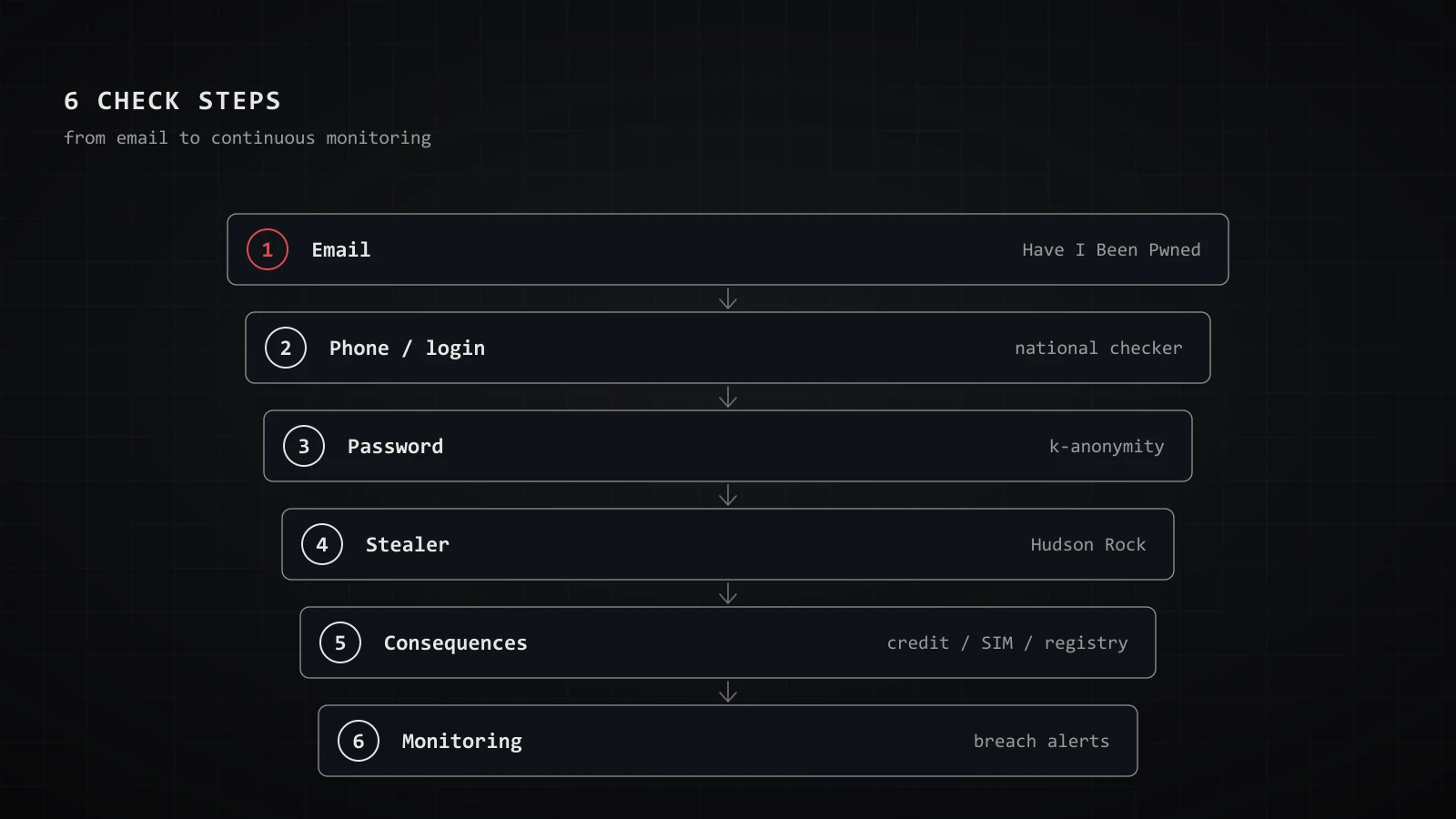
The question "has my data leaked" reads differently in 2026 than it did two years ago. Back then the answer was one line: "put your email into Have I Been Pwned." Today that's just the first of six steps — and, more importantly, a clean result in a checker guarantees almost nothing anymore. The guide covers three things: how to check your email, phone and passwords; where the line runs between safe self-checking and handling stolen data; and what to do in the first 24 hours after a checker shows "Oh no — pwned!"
I write from a defensive stance: the goal is to see your own digital footprint before someone else uses it against you — not to build a dossier on anyone else.
First, the legal line: where self-checking ends and risk begins#
Start with what almost every listicle skips — the legal frame. Checking your own identifier in a service that doesn't hand you anyone else's data (HIBP, XposedOrNot, a national breach checker) is safe: you don't obtain or store third-party personal data; the service just answers yes/no about you.
Where legal risk actually lives, in most jurisdictions, is the next step: downloading breach dumps "to find yourself" means storing a database full of other people's personal data, and using underground lookup bots puts you inside a market built on illegally obtained data. In Russia this is now criminalized explicitly (Article 272.1 of the Criminal Code, in force since 11 December 2024); in the EU, UK and US, handling large stolen datasets carries its own liability. The consistent principle: intent to check yourself isn't the problem — obtaining and holding stolen data is. My conservative rule: only use services that never return raw data, and never download dumps. For anything with legal weight — documenting a breach, filing a claim — talk to a lawyer, not a blog.
Service map: who actually sees what#
The main flaw in beginner roundups is listing ten services with commas and never explaining that they hold different databases and search different fields. Here's the matrix that tells you where to go with which identifier.
| Service | Searches by | Whose database | Price |
|---|---|---|---|
| Have I Been Pwned | email only | ~17 bn records | free; paid API |
| XposedOrNot | email, password, domain | hundreds of breaches, open password database | free + open API |
| Hudson Rock | email, domain, username | infostealer logs | free |
| Intelligence X | email, domain, IP | darknet, pastes | 50 queries/day free |
| DeHashed / LeakCheck / Snusbase | email, username, phone, IP | billions of records | paid, shows the raw data |
| National breach checkers | email, login, phone | regional public leaks | usually free |
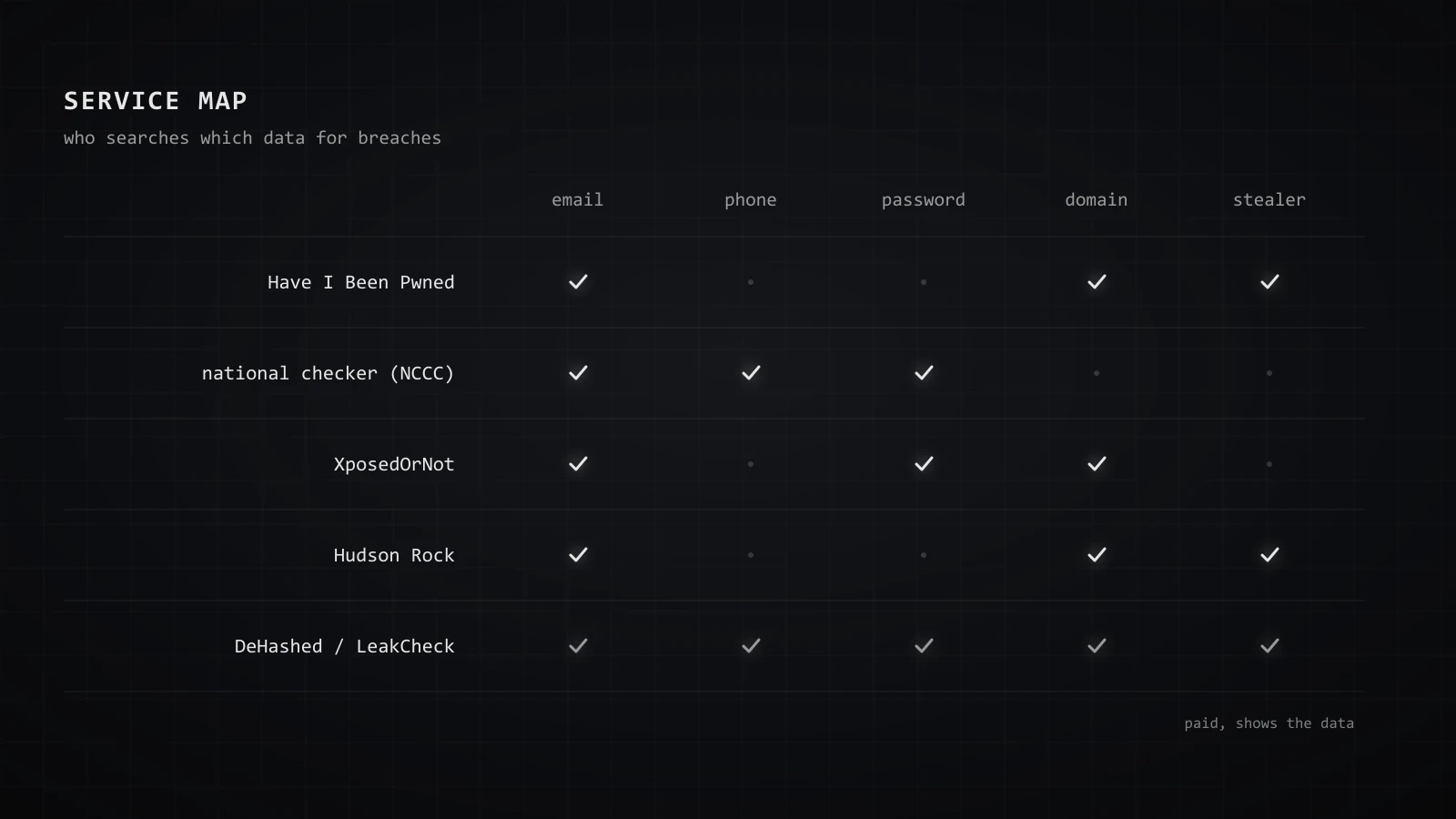
Three takeaways:
- HIBP covers email only. The service confirms this itself: website search accepts an email address and rejects a username or phone number. Phone search was enabled in 2021 for the Facebook leak (which had no emails), but no breach since has loaded phone numbers as a field. So older "HIBP searches by phone" guides are wrong.
- Regional public leaks need a regional checker. HIBP's sources skew Western; fresh breaches from local logistics, retail and delivery services often never reach it. A national breach-check service (in Russia that's the state-run chk.safe-surf.ru) covers those better and can search by phone.
- Paid engines show you the raw data — and that's the trap. DeHashed and peers return plaintext passwords and other fields. That crosses from "checking yourself" into handling other people's data, and it's overkill for a self-check.
One clarification on providers often mislabeled as "checkers": some, like DLBI, are API and monitoring providers, not consumer sites with a form — their data is embedded in other services rather than searched directly. And drop the dead ones: GhostProject, Vigilante.pw and BreachAlarm from 2019–2023 roundups are closed or defunct, and both Google's Dark Web Report (scanning stopped 15 January, access ending 16 February 2026) and the paid Mozilla Monitor Plus shut down around the turn of 2026. If a guide still recommends these, it's stale.
Checking properly: email, phone, password#
Email. Open haveibeenpwned.com, enter the address, and you'll get the breaches it appeared in, with dates and the type of data exposed. Check not just your main mailbox but old ones tied to forgotten accounts — those surface most often in combo lists. Then run the same address through a national checker and XposedOrNot; their databases differ, so what one misses the other may catch.
Phone. Free HIBP no longer searches by number, so a national breach checker (in international format) is your tool. Silence there doesn't mean the number is safe — see "why clean guarantees nothing."
Password. Understand the mechanics, or the check itself becomes a leak.
k-anonymity: why checking a password is safe (and where NOT to type it)#
When you check a password via Pwned Passwords or the built-in manager in Chrome, Firefox or your browser, the password doesn't leave in full. k-anonymity handles it: the SHA-1 hash is computed locally, only the first 5 characters of the hash go to the server, the server returns all matching suffixes, and the comparison happens on your device. The server never learns which password you checked. HIBP's k-anonymity search also works for email addresses, but only on the paid Pro and High RPM API tiers.
Practical rules I treat as hygiene:
- Never type a full password anywhere except Pwned Passwords or your built-in manager. Any "enter your password, we'll check it" form without explicit k-anonymity is a potential trap.
- Never enter a login + password pair together. A legitimate checker never asks for that.
- Checkers from ads or messenger links are phishing by default. A well-known 2019 write-up showed that a breach-check page can be run by the attackers themselves to log "live" addresses and raise their resale value. The argument holds for any unknown service.
- The paranoid option is to type nothing and set up monitoring instead (see the end): then the alerts come to you.
Baseline password hygiene — uniqueness, a manager, a hardware second factor — is its own topic; I covered it in the piece on digital hygiene mistakes.
How to check if you're in stealer logs#
Stealer logs are what's left when it's not a service that leaked, but you.
This is the section missing from nearly every "check your breaches" guide — a mistake, because in 2024–2026 infostealer logs became the primary compromise channel.
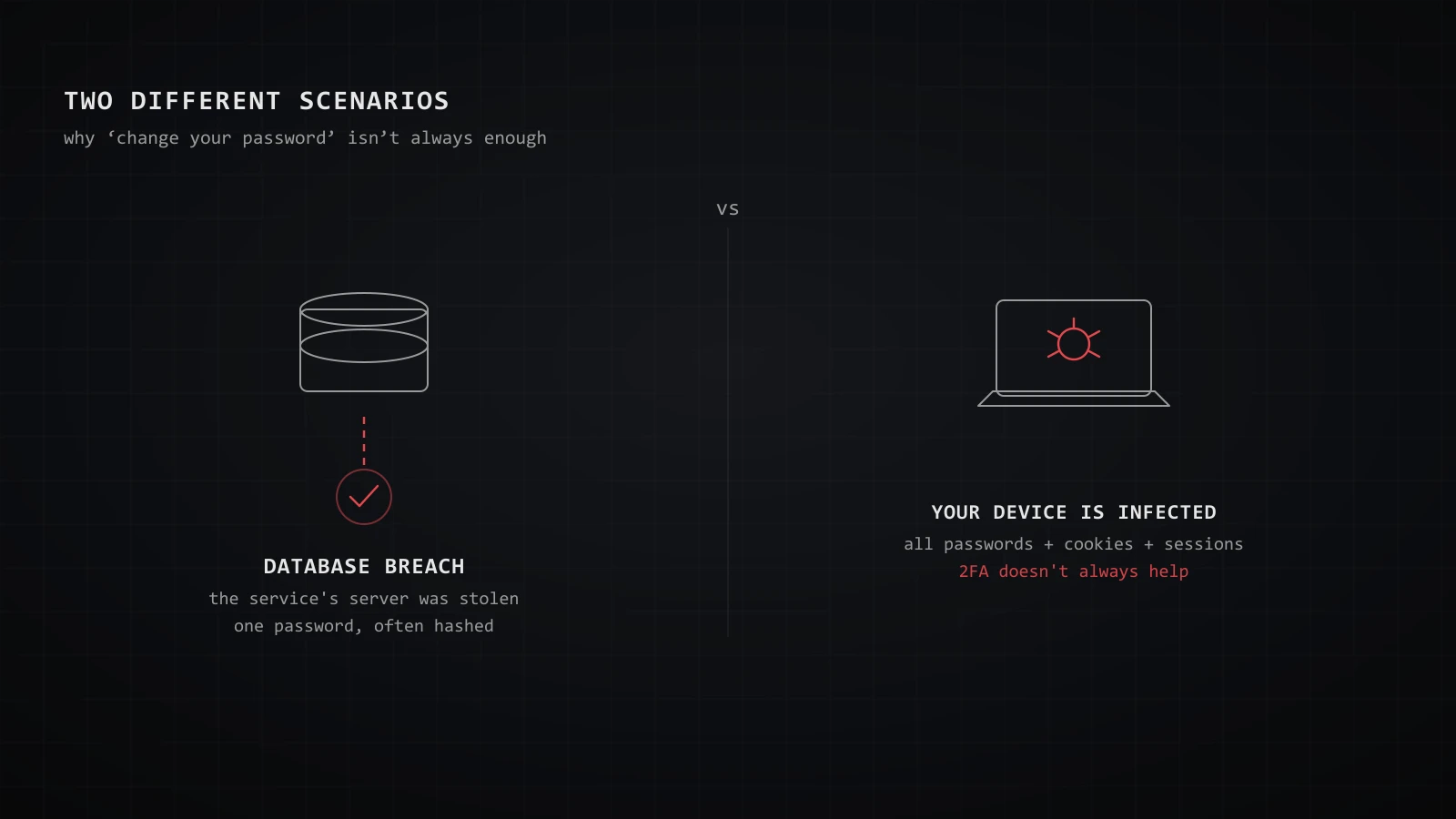
The difference matters. A database breach means a specific service's database was stolen; it holds your password for one site, often hashed. A stealer log means your own device was infected: malware (RedLine, Lumma and the like) pulled every password saved in the browser, along with cookies and session tokens. Here even two-factor auth doesn't always help — the live session itself is stolen.
The scale shows in HIBP's loads: in February 2025 it ingested the ALIEN TXTBASE corpus — 284 m accounts from 1.5 TB of Telegram-shared logs; in autumn 2025, the Synthient Threat Data at 23 bn rows with 183 m unique addresses, 16.4 m of them never seen in any earlier breach.
How to check whether you're specifically in stealer logs:
- HIBP. Verify ownership of the address via the free notification service — once verified, your dashboard lists the domains your email appeared against in stealer logs. Anonymous log search is deliberately disabled: the data is too sensitive.
- Hudson Rock — hudsonrock.com/are-you-compromised: a free check by email, domain or username against the infection database, plus free monitoring of up to three emails, three domains and three usernames.
- The marker in HIBP results. If your address turns up in "ALIEN TXTBASE" or "Synthient Stealer Log Threat Data," that's a signal the device you logged in from was infected.
Troy Hunt's caveat: an "email + domain" record only means that's what's in the log — it doesn't prove the address owner actually visited that site. But if you see yourself in a stealer corpus, the response is different, and order matters (see the protocol below): clean the device first, change passwords second.
Why a clean checker guarantees nothing#
Every beginner guide ends the same way: "nothing found — you can relax." In 2026 that's a dangerous falsehood. Four reasons a clean result doesn't mean you're safe.
First — public breach markets have contracted. According to DLBI's assessment, only 61 breaches reached public access in Russia in 2025 — seven times fewer than the year before, with volume down roughly tenfold; at least 40 more significant leaks never even reached limited access. The reason isn't less theft — Telegram-bot operators buy quality data exclusively for retail resale, and it never reaches the public databases that checkers index. The same dynamic plays out in other regions: the best data leaves the open market.
Second — coverage gaps. Any single checker skews to certain regions and sources; yours may simply not be indexed.
Third — stealer logs are indexed differently and won't show up in a plain "breach" search without separate verification.
Fourth — disclosure lag. Companies don't always disclose incidents, and rarely do so immediately. Your data may already be circulating while no checker has it yet.
The takeaway to keep in mind: a negative result reads not as "I didn't leak" but as "I wasn't found in public databases today." The right strategy is monitoring plus consequence-checking, not a one-off lookup.
Checking the consequences: identity, credit, SIM#
While Western guides teach you to check your email, it's often more useful to check something else: whether someone has already used your leaked identity data. This link — from "check the breach" to "check the fallout" — is missing from nearly every article.
- Credit. Pull your credit report and place a credit freeze (or the local equivalent) so lenders can't open accounts in your name even if a fraudster has your data. Watch for fresh applications and lender inquiries you didn't make.
- SIM / carrier. Set a port-out PIN or number lock with your carrier to blunt SIM-swap, and check which numbers are registered to your ID where your provider or national portal exposes that. What can and can't actually be learned from a number, I covered separately.
- Companies in your name. Check the business registry for any company that lists you as director or owner but that you never opened — a rare but heavy misuse of leaked ID data.
For executives and public figures, add the piece that usually falls through: review active sessions on your key government and financial portals and enforce two-factor auth there — it's the single entry point to everything above. I walk through this "contours" logic in the piece on OPSEC for executives.
The first 24 hours: a protocol#
"Change your password and enable 2FA" is right but insufficient: the response depends on what leaked and in what order you act. The matrix:
- A password leaked. Change it — and everywhere it's reused (your manager will show duplicates). Revoke active sessions. If an account has already been taken over and you can't get back in, we can help you regain control of the account.
- A password from a stealer log. Order is critical: first find and clean the infected device (antivirus, and if in doubt, a full OS reinstall), and only then change all passwords and revoke sessions and API tokens. Do it the other way around and the new password leaks through the same stealer the same day.
- A phone number leaked. Expect targeted vishing "from the bank's security team," enable spam-call blocking, consider a separate number for banks.
- ID/passport data leaked. Freeze credit, lock SIM porting, check your credit report and the business registry. If someone tried to open something, file a police report.
- Email + phone + full name together. That's a targeted-phishing kit. Brief your family and assistant, agree on a code word for "calls from you."
On speed: per DLBI's assessment, leaked login-password pairs start getting used for account takeover within about seven days on average, corporate ones within three. The reaction window is measured in days, not months.
"Delete yourself from a breach" — a myth, and what actually works#
A common question: can I delete my data from a leaked database? From the dumps themselves — no. The data is copied endlessly; removing it from one copy changes nothing. Any service promising to "erase you from breaches" for a fee is selling a half-measure or an outright con.
What actually works:
- Demand removal from the source operator. Most privacy regimes give you a right to erasure or to stop distribution from public access — GDPR Art. 17 in the EU/UK, statutory erasure rights elsewhere; the operator must comply within a set window. On refusal, escalate to the regulator or court.
- Right to be forgotten / de-indexing — removes search-engine results, not the data itself. The full cleanup playbook — brokers, aggregators, search results, old accounts — is in the guide on removing your personal information from the internet.
- Devalue what leaked — the most practical move: rotate passwords, change the number your banks use, freeze credit. The goal isn't to erase the data but to make it useless.
Monitoring instead of a one-off check#
Checking yourself once is like taking your temperature once a year. Breaches happen continuously, so the right model is a subscription to change. Three tiers.
Personal (free). On HIBP, enable Notify me — you'll get an email the moment your address lands in a new load; after verification you also see the stealer section. Mozilla Monitor does the same on HIBP data for up to five addresses. Hudson Rock monitors three emails, three domains and three usernames. If you code, XposedOrNot has a free API to put a check on a cron job.
Family and VIP. Monitor the addresses of relatives and assistants (with consent) — a classic blind spot: the principal is locked down, but the whole perimeter is open through an assistant.
Corporate. HIBP offers Domain search: after verifying the domain via a DNS record, you see which corporate addresses appeared in which breaches, plus separate access to stealer logs by domain. For domains with a small number of affected addresses this is free. Beyond that, DRP platforms (BI.ZONE, Kaspersky Digital Footprint Intelligence, and regional equivalents) monitor closed forums and marketplaces.
If you need the whole picture rather than one address — how an adversary sees you from outside — that's digital-footprint work. What it involves is on the OPSEC consulting page; when needed we walk the perimeter together as part of digital-footprint intelligence.
FAQ#
How do I check if my data was breached for free?#
Put your email into Have I Been Pwned, and check your password via Pwned Passwords or your browser's built-in manager — those use k-anonymity, so the password never leaves in full. For phone and login, use a national breach-check service. Run the email through XposedOrNot too: the databases differ.
Can I check a breach by phone number?#
Not on free HIBP anymore — it accepts email only; phone search existed just for the 2021 Facebook leak. National breach checkers do search by number in international format. But there's no legitimate public checker for "was my passport/ID leaked" — any service or bot promising that runs on stolen databases. Check the consequences instead: credit report, SIM/carrier account, and the business registry.
Is it legal to check my own data in leaked databases?#
Entering your own identifier into a checker that doesn't hand you other people's data (HIBP, XposedOrNot, a national checker) is safe. Downloading dumps or using underground lookup bots is where legal risk lives — that's handling illegally obtained personal data, and in some jurisdictions a specific criminal offence. For anything with legal weight, consult a lawyer.
What should I do if my data leaked?#
Act by data type: a password — change it everywhere it's reused and revoke sessions; ID data — freeze credit and lock SIM porting. The special case is a stealer log: clean the infected device first, change passwords second, or the new password leaks the same way. Per DLBI's assessment, the window before attacks begin is a matter of days.
Can I delete my data from a breach?#
From the dumps themselves — no, they're copied countless times. But you can demand removal from public access at the source operator (GDPR Art. 17 and equivalents), de-index search results via the right to be forgotten, and above all devalue what leaked: rotate passwords and numbers, freeze credit.