To find someone by username, work through five steps: find which platforms the handle lives on; pin down the permanent ID of every account you find; use those IDs to recover earlier usernames; run every handle through Maigret or Sherlock; and confirm that the profiles belong to one person using strong signals, not identical spelling.
Most guides stop at "paste the handle into a username checker". In practice the dead end comes earlier: the person you met on Discord or Telegram has renamed, and the old @handle now leads nowhere — or to someone else. That is where the actual work starts.
I cover this from a defensive angle: the same sequence shows how others see you. There's a section at the end on auditing your own handles.
Five steps: the short route#
- Platform map. Put the handle into profile URLs on the platforms that matter and into the big username checkers.
- Permanent ID. For each account you find, record its numeric identifier. It survives a rename.
- Username history. Use the ID to recover earlier handles: memory.lol for X, SangMata for Telegram, previous aliases on Steam, the Wayback Machine for the rest.
- Automated enumeration. Feed every handle from steps 1–3 into Maigret or Sherlock.
- Verification. Open every hit by hand and accept a match only on strong signals.
Almost nobody does steps 2 and 3. They turn a ten-minute search into an hour — but the result holds up when someone checks it.
Where a handle lives: which platforms let people rename#
The first thing I do with a new handle is type it into profile URLs by hand. It's faster than any service and immediately shows where an account exists and where it doesn't.
| Platform | Profile URL | Can the handle change? | Permanent ID |
|---|---|---|---|
| X (Twitter) | x.com/<handle> | yes | numeric user ID |
instagram.com/<handle> | yes | numeric user ID | |
reddit.com/user/<handle> | no | the username itself | |
| GitHub | github.com/<handle> | yes | numeric id in the API |
| Telegram | t.me/<handle> | yes, instantly | numeric user ID |
| Discord | no public profile URL | yes | 17–19-digit snowflake ID |
| YouTube | youtube.com/@<handle> | yes | channel ID (UC…) |
| Steam | steamcommunity.com/id/<handle> | yes | SteamID64 |
Two things in this table decide the rest of the search.
Where a handle can't change, it's an anchor. Reddit doesn't let you change a username once it's finalized — not even the capitalization — and a deleted username is never issued again. A Reddit account opened eight years ago still carries the original handle, even if its owner has since renamed everywhere else.
Where a handle can change, you need the ID. On X, Instagram, GitHub, Telegram and Steam, renaming takes a minute, and the old handle is released for someone else to claim. A match on the current handle tells you about the present, not the past.
The key step: from handle to permanent account ID#
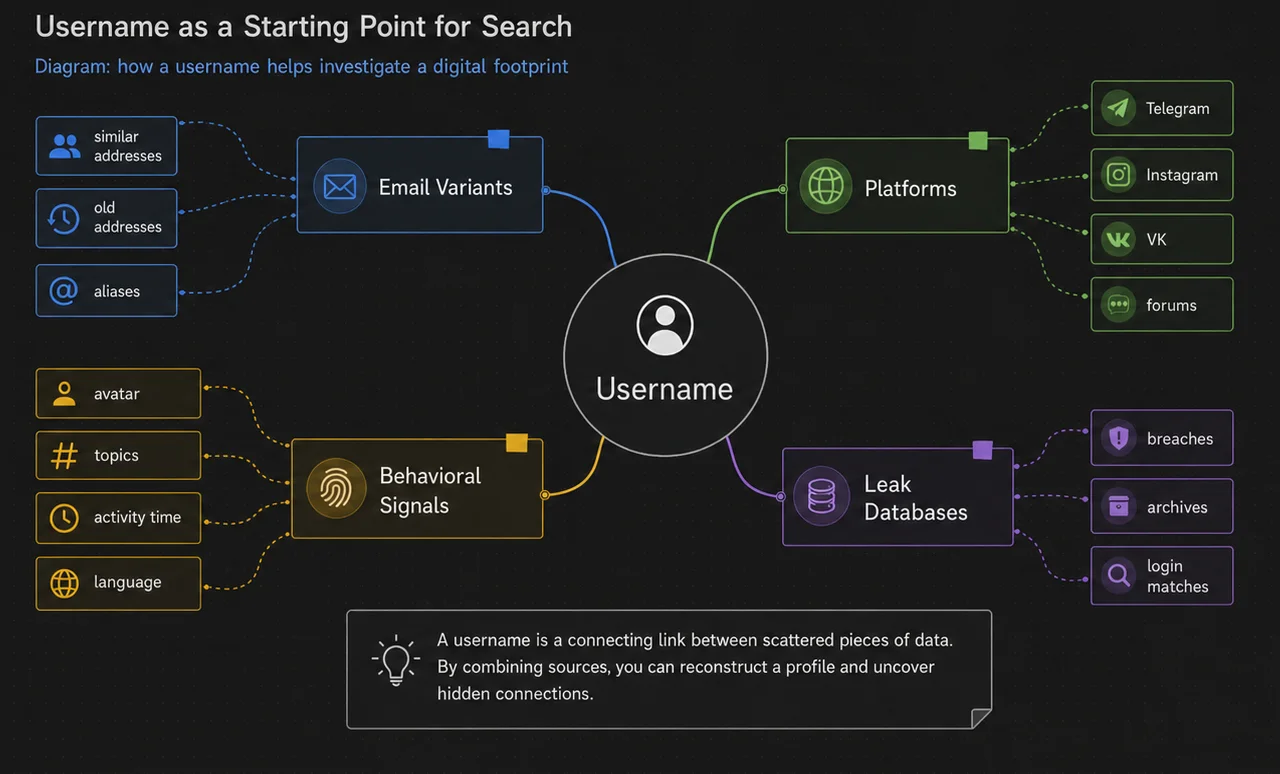
A handle is a sign on the door; the ID is the street number. You can repaint the sign, the number stays. Once I have the numeric ID, a rename stops being a problem: old mentions, archived pages and change histories are tied to it.
X: handle → user ID#
Every X account has a numeric user ID that never changes. ID-lookup services such as TweeterID convert a handle into it, and memory.lol (below) returns it alongside the handle history. The reverse works too: https://x.com/i/user/<id> redirects to whatever the account is called today. If someone renamed after a conversation, the ID you saved takes you straight to the new handle.
Telegram: @username → user ID#
Telegram gives every account a numeric user ID that doesn't change with the username or display name. Two ways to get it:
- in Telegram Desktop, turn on "Show Peer IDs in Profile" in the experimental settings (Settings → Advanced → Experimental settings; the menu names shift between versions) — the ID then appears on the profile;
- forward one of the person's messages to an ID bot.
Be careful with the second option: you're telling a third-party bot who you're interested in. For sensitive checks I only use the client setting.
Discord: the ID also tells you the account's age#
Discord shows no profile URL, but every account has a snowflake ID. Turn on Developer Mode (User Settings → Advanced), right-click the user and choose Copy User ID.
The ID carries the account's creation time. According to Discord's developer documentation, shifting the ID right by 22 bits and adding the Discord epoch (1420070400000, the first second of 2015) gives the creation timestamp in milliseconds. Any snowflake decoder does the arithmetic for you. A "supplier with ten years in the trade" whose account is three weeks old is a finding in itself.
GitHub: the ID hides in the noreply email#
The numeric id sits at https://api.github.com/users/<handle>. Two details matter:
- After a rename, GitHub releases the old username for anyone to claim, but keeps redirecting web links to the account's repositories — an old repository link can lead you to the new handle.
- For accounts created after 18 July 2017, GitHub's private commit address has the form
ID+USERNAME@users.noreply.github.com(GitHub Docs). The numeric ID is inside the address, so commits made under the old username still point to the same account.
YouTube, Steam and the rest#
- YouTube. The
@handlecan be changed; the channel ID — theUC…string at the end of the standard channel URL — stays permanent. - Steam.
steamcommunity.com/id/<handle>is a custom URL that the owner can change. The permanent one is the SteamID64 insteamcommunity.com/profiles/7656…. Maigret's--parse(see the commands below) pulls IDs and usernames from such a page. - Platforms that don't expose an ID. Here the anchor is the registration date and archived copies of the page.
How to find someone who changed their username#
A rename doesn't erase the trail. It moves the trail to places few people look.
To find someone who changed their username, get the account's permanent ID first (previous section), then look up the handle history for that ID: memory.lol for X, SangMata for Telegram, the former-usernames entry on Instagram, previous aliases on Steam, and the Wayback Machine for everything else.
X (Twitter) username history: memory.lol#
memory.lol, built by Travis Brown, holds screen-name history for hundreds of millions of X accounts going back to 2011. A lookup by handle (/v1/tw/<handle>) or by ID (/v1/tw/id/<id>) returns the account ID and the handles it has used. The limit is important: public access is mostly restricted to facts observed in the past 60 days, and the full history is open only to vetted researchers, journalists and activists. An empty public answer doesn't mean the handle never changed.
Telegram username history: SangMata#
SangMata is a bot that sits in public groups and passively records when members change their name or username. Give it a user ID and it shows the history it has captured: earlier usernames, earlier display names, approximate dates. At the time of checking, lookups by ID were free and lookups by @username were a paid feature.
The limitation is structural: Telegram keeps no public log of renames and offers no API for one. If the person never sat in groups where the bot was present, there is no history. An empty SangMata result proves nothing.
Short "collectible" Telegram usernames are a separate case: since 2022 they have been sold on the Fragment auction as NFTs on the TON blockchain, and fragment.com/username/<handle> shows bids and the owner's wallet address. It only applies to purchased handles, but if someone is proud of a four-letter @handle, it's worth a look.
Instagram former usernames: the change counter#
On any profile, "…" → About this account shows the join date and, if the account has renamed recently, a Former usernames entry. For other people's accounts Instagram now shows only how many times the handle changed, not the old handles themselves. That is still a signal: an account with a supposed ten-year history that renamed four times this year deserves a closer look.
Steam previous aliases#
A Steam profile shows a dropdown of recent aliases next to the display name. The owner can clear it, but many never do — and the list keeps names the person used elsewhere for years.
Everything else: the Wayback Machine#
Google retired its cached-page link and the cache: operator in 2024, so the Wayback Machine is now the main source of old profile versions. Paste the profile URL and look through the snapshots: an old copy of x.com/<handle> or instagram.com/<handle> may show whose account sat on that handle before.
Every old handle you recover is a new entry point. I run it through steps 1 and 4 exactly like the current one. Often it's the old handle — picked before the person started thinking about privacy — that leads to a profile with a real name.
Maigret vs Sherlock vs WhatsMyName: automated username search#
The manual check in step 1 covers a dozen platforms. Tools cover thousands. I run them after the manual step, not instead of it, so I have something to check their output against.
| Tool | Sites | Strength | When I use it |
|---|---|---|---|
| Maigret | 3,000+, top 500 by default | recursive search, pulls IDs from profiles, reports | main tool |
| Sherlock | 400+ | speed, almost no setup | quick first pass |
| WhatsMyName | 700+ | browser-based, nothing to install | when I can't run a CLI |
| Snoop | 5,400+ in the full version | strong coverage of Russian-language sites | targets from Eastern Europe |
Maigret: the commands I actually use#
pip install maigret

# quick pass over the top-500 sites
maigret handle

# only sites tagged with a country or category
maigret handle --tags us

# every site in the database + reports for the case file
maigret handle -a --html --pdf

# several handles at once: current and recovered old ones
maigret handle old_handle handle1990

# pull IDs and linked usernames from a profile page, then search on them
maigret --parse https://steamcommunity.com/profiles/<SteamID64>
What sets Maigret apart is recursion. From each profile it finds, it extracts extra identifiers — other usernames, IDs, links to neighbouring accounts — through the socid_extractor library and searches on them straight away. One handle becomes a graph in a single run. Recent versions also include a local web interface (--web) that draws that graph. Flags change between releases; check maigret --help before relying on this list.
Sherlock: the quick start#
pipx install sherlock-project
sherlock handle old_handle
Sherlock is in the 0.16 line; since 0.16 it disables sites with unreliable detection on its own, and false positives dropped noticeably. For a first sweep in a minute, it's enough.
WhatsMyName: no install#
WhatsMyName, started by Micah Hoffman and now community-maintained, checks 700+ sites from the browser. There are look-alike sites with similar names; the original is whatsmyname.app, and it is free.
Search engines: Google and Bing see different webs#
Searching the handle in quotes is in every guide, and it really is the first query. The difference is in the details.
Google is strongest on GitHub, Reddit, forums and old pages. Bing keeps a different index and often surfaces pages that Google doesn't show; DuckDuckGo draws heavily on Bing's results, so it rarely adds much on top. For handles tied to Russia or Eastern Europe, add Yandex.
"handle" site:reddit.com
"handle" site:github.com
"handle" -site:x.com -site:instagram.com
"handle" "Seattle" OR "web developer"
The third query is the one people skip: excluding the big platforms pushes forums, comment sections and personal sites to the top — that's where the old traces are. I run the same queries in both engines and compare: the finds differ noticeably, and one engine isn't enough.
What profiles leak on their own: GitHub email and linked fields#
Some platforms publish more than their owners realise.
GitHub. If someone committed to public repositories without a private address, the email shows up in two places:
https://api.github.com/users/<handle>/events/public
https://github.com/<handle>/<repository>/commit/<hash>.patch
In the first, look for author.email in push events; in the second, the From: header of the patch. If the address ends in @users.noreply.github.com, the person turned on email privacy — but, as above, the number before the + is still the account ID.
Portfolio and bio links. Personal sites, Linktree pages, Medium and Substack profiles often link to GitHub, X and Telegram at once — ready-made mutual links for the verification protocol below.
Email candidates. The classic trick is to pair the handle with common domains (handle@gmail.com, handle@outlook.com, handle@proton.me) and check them in Have I Been Pwned. It works, but an email that matches a handle proves nothing on its own. How to read breach results properly is covered in the guide on checking your own breach exposure.
How not to get the wrong person: a verification protocol#
The most expensive mistake in a username search isn't "found nothing" — it's "found the wrong person". So I grade every match on a scale of signals.
| Strength | Signal | Example |
|---|---|---|
| Strong | mutual link between profiles | the GitHub profile links to an X account, and that X bio links back to GitHub |
| Strong | the same permanent ID, email or phone published in both profiles | the same email in a commit .patch and on a portfolio site |
| Strong | a unique avatar confirmed by reverse image search | a personal photo, not a stock image |
| Strong | a rare phrase or typo in the bio | the same quote in profiles on three platforms |
| Medium | same city and age | "Austin, 34" in two profiles |
| Medium | same professional field and interests | Rust development and the same niche communities |
| Medium | overlapping activity times | posts in the same hours, one time zone |
| Weak | only the same handle | especially a short or popular one |
| Weak | a hit in Maigret or Sherlock output without a manual check | the site may answer yes to any handle |
The rule: "this is one person" takes at least two strong signals, or one strong and two medium. Anything less is a hypothesis, and that's what I call it in the report.
The avatar deserves its own note: the same photo links profiles even when the handles differ. How that works and which engines search by face is covered in the piece on finding someone by photo; the reverse — how to block face search for your own photos — is covered separately.
Case study: a supplier from a Discord server#
A synthetic case based on a common scenario; details changed.
An entrepreneur — call her Emily — found a supplier of custom furniture in a niche Discord server. All communication went through craftworks_trade; no website, no company name, and a USD 5,000 deposit before production. The task: find out who's behind the handle before sending money.
Step 1. Platform map. No craftworks_trade on Reddit, GitHub or X; a Telegram account with that handle exists. Maigret over the top 500 returns three forum hits — I open each one, and two turn out to be false (the sites answer "found" to any handle).
Step 2. IDs. Developer Mode gives the Discord user ID; the snowflake decodes to an account created in 2019 — not a throwaway. Telegram Desktop gives the Telegram user ID.
Step 3. History. SangMata, queried by that Telegram ID, shows an earlier username, cw_woodshop, used until about two years ago.
Step 4. Old handle through the tools. Maigret on cw_woodshop finds a Reddit account in a woodworking community, and its profile links to a personal portfolio site. The site links back to the same Reddit account and to a GitHub profile; a commit .patch on that GitHub shows an email on the portfolio's own domain, signed "Michael".
Step 5. Verification. Two strong signals: the mutual link between the site and Reddit, and the email matching the portfolio domain. One medium: the furniture photos in the Reddit posts match the ones he'd shown in Discord. Conclusion: a real maker with a verifiable history, not a one-off account.
What came next. The contract went out in his real name, and the deposit went through an escrow service instead of a direct transfer. When the counterparty is a company rather than a person, the checks differ: the free registry route — state filings, liens, court records — is in due diligence on a company, which also covers buying a company outright; if the company is Russian, the route is in how to check a Russian company. A rename two years ago isn't a red flag in itself — people rename for a hundred reasons. A red flag would have been an "experienced supplier" whose accounts leave no trail at all.
Audit what your own username reveals#
Everything above can be done to you just as easily — to an executive, an investor, a public figure. I advise clients to walk this route backwards every six months.
- List every handle you've used in the past ten years, including gaming and forum ones.
- Run them through
maigret <handles> -a --htmland open the report: where profiles are still alive and what they show. - Look yourself up on memory.lol and, with your Telegram ID, in SangMata: which old handles and names are on record.
- Clear previous aliases on Steam.
- Turn on "Keep my email addresses private" on GitHub; old commits keep the old address, so check them too.
- Separate your handles: one handle per platform, and never as part of an email address or a password.
- Check avatars: the same photo on a work and a personal profile links them more reliably than a handle.
You can't erase the old history completely: memory.lol, SangMata's logs and the Wayback Machine don't answer to you. What you can do is stop feeding it and separate your work and personal footprints. How to do that systematically is in OPSEC for executives; the basics of what forms your footprint are in What is OPSEC, and the usual slip-ups are in 10 digital hygiene mistakes.
Where open data runs out#
The route fails when:
- the account was created for one conversation and never appeared anywhere else;
- the person uses a unique handle and a unique avatar on every platform;
- profiles are private, and old ones were deleted before any archive caught them;
- on Telegram, the person never joined public groups, so SangMata never saw them.
In those cases the honest result is "not established from open sources". The next level is open-source intelligence with sources that search engines don't index — or a different entry point: a phone number (how people get found by one is in the guide on finding someone by phone number) or a photo.
Viewing public profiles is generally lawful. The line is crossed when you try to get into someone's accounts — covered by laws such as the US Computer Fraud and Abuse Act and the UK Computer Misuse Act — or when collecting information turns into stalking or harassment; if the result may end up in a dispute or in court, agree with a lawyer in advance on how to preserve the evidence.
A word on Telegram "lookup" bots that promise names and phone numbers from a handle: I don't recommend them and don't link to them. Their data comes from leaked databases, and using it to profile a private person can breach data-protection law in many jurisdictions. And if it's not your online trail that worries you but the device itself, see how to check your phone for spyware.
Conclusion: how to find someone by username without fooling yourself#
Finding someone by username doesn't mean finding the same spelling on ten sites. It means moving from a changeable handle to a permanent ID, recovering the earlier handles and confirming the link between profiles with strong signals. The handle is the entry point, the ID is the anchor, and the verification protocol is what separates a result from a guess.