A phone number gives up the carrier and region, the messengers and accounts tied to it, and often a name — no shady databases required, just channels everyone uses every day. That cuts both ways: it's how you vet an unknown seller before sending a deposit, and it's how someone builds a picture of you.
Below: what a number reveals and through which channels, how to close each channel on your own number, how to check an unfamiliar number legitimately before a deal, and why "find anyone in 5 minutes" lookup sites are a dead end. A number reveals more than a username because it's tied at once to a SIM, a bank or payment app, and messengers.
What a number really reveals, and what's myth#
| What | Reliability | Where it comes from |
|---|---|---|
| Country, region, carrier (allowing for porting) | Reliable, legal | Carrier lookups (HLR, ported-number databases) |
| Line type (mobile / VoIP) | Reliable | The same lookups |
| Registration on messengers and services | Reliable | Search-by-number in messengers, sign-up forms |
| Name (first name, last initial) | Partial | Caller-ID apps, payment-by-phone name display |
| Social profiles, listings, forums | Partial, needs checking | Places the number was published |
| Exact phone location | Myth | No consumer path; only the carrier or lawful intercept |
Why "location by number" is impossible#
This is the myth that lookup-site ads are built on. An HLR (Home Location Register) lookup queries the carrier's database and returns the number's status, carrier, roaming state, and the region of the switch. There are no phone coordinates in the response. Some carriers route a whole region through a single switch, so a "geolocation" of such a number keeps pointing to the same city regardless of where the subscriber actually is.
Real positioning is available only to the carrier and to law enforcement under a court order, or through attacks on the SS7 signaling network. Neither is sold as a "tool by number," so any promise to "show where the person is right now" is marketing.
What a number reveals: the channels and how to close them#
Each channel below gives up one piece; together they add up to a profile: name, accounts, city, listings, an old email. For each one: what an outsider sees, and what to do about your own number.
Carrier and region#
Carrier lookups return the country, region, carrier, and line type. A VoIP number (Google Voice, an online line) usually has no bank or real accounts tied to it — which is exactly why it's useful for one-off sign-ups. There's nothing to close here, and no need: on its own, this layer says little about the person.
Messengers#
Saving a number to contacts is enough to see whether an account sits behind it. Telegram, depending on privacy settings, shows a username, avatar, and last-seen time; WhatsApp shows the profile photo and status; Signal confirms registration. The avatar is the most valuable lead: a reverse image search often finds the same photo elsewhere (how that works).
How to close it: in Telegram, Settings → Privacy and Security → Phone Number, set "Who can find me by my number" to "My Contacts"; in WhatsApp, restrict profile photo and About to your contacts. Don't use the same avatar on your private number as on public profiles.
Caller-ID apps#
Truecaller, GetContact, and similar apps collect names from millions of users' address books. A lookup shows how other people saved the number — often a real name or a label like "Marcus, Auto Parts," sometimes an employer.
How to close it: in Truecaller, deactivate the account in the app first, then unlist the number at truecaller.com/unlisting in international format; in GetContact, verify the number through the profile-management form and turn off visibility in public search. Both refill from other people's address books, so recheck your card every few months.
Payment by phone number#
Payment apps show who you're paying before you confirm. In the US, starting a Zelle transfer to a number displays the recipient's name; in the UK and EU, Confirmation of Payee shows the account holder's name during setup. It exists to prevent misdirected payments, but it also reveals the name behind any number enrolled in a payment service.
How to close it: don't enroll your private number in payment apps — Zelle and most others let you enroll with an email or a separate number instead.
Linked accounts and email#
Many services' sign-up and password-reset forms reveal whether an account exists for a number. That builds a list of where the number shows up, and often surfaces a linked email — which opens the next layer: profiles, breaches, old registrations.
How to close it: remove the number as a login and recovery method wherever you can; use email aliases and a separate number for sign-ups.
Public listings, resumes, forums#
Numbers end up in listings, resumes, forum signatures, and the cache of deleted pages, written in different formats. Google, Bing, and DuckDuckGo each index a slightly different slice of the web, and a deleted listing often survives in a cache or an aggregator.
How to close it: once a quarter, search your own number in quotes in several formats (+1 (415) 555-0142, 415-555-0142, 4155550142) and remove what you find at the source. Which removals work and how is covered in the guide on removing your personal information from the internet.
People-search sites and breaches#
Whitepages, Spokeo, BeenVerified, TruePeopleSearch, and dozens of clones aggregate public records, marketing data, and old leaks into instant "reports." Breached datasets add names, cities, and delivery addresses to a number or its linked email.
How to close it: opt out of the major people-search sites — the CCPA and California Delete Act in the US and GDPR Art. 17 in the EU/UK back those requests — and devalue whatever has leaked. The order of checks is in the section on monitoring breaches below and in the guide on how to check whether your data has been breached.
How to protect your own number#
A short checklist across all channels:
- Set a carrier port-out PIN / Number Lock
- Replace SMS-2FA with an authenticator app or a hardware key
- Split numbers by role (the "three numbers" model)
- Lock down search-by-number in messengers
- Keep your private number out of payment apps
- Unlist from caller-ID apps and opt out of data brokers, then recheck quarterly
- Check your number against breaches and set up monitoring
Lock down SIM porting. A SIM swap hijacks your number by re-issuing the SIM at the carrier, and it breaks any SMS-2FA. Under FCC rules that took effect in 2024, US carriers must authenticate SIM changes and port-outs; enable the port-out PIN / Number Lock every major carrier now offers. Remove the number as a recovery factor where you can, move SMS codes to an app (Google Authenticator, Aegis) or a hardware key (YubiKey), and put your email, which is the master key to everything, behind a hardware key or passkey. More on second factors is in the piece on digital hygiene mistakes.
Segment your numbers. Turn "get a separate number" into a three-role scheme: a private number only for family and banks, a public one for business cards and services, and a disposable one (an eSIM or a VoIP line like Google Voice) for one-off sign-ups. The private number stays off public profiles and out of payment apps.
How to check an unfamiliar number before a deal#
The legitimate reason to check someone else's number is usually the same: an unknown seller, contractor, or landlord, and you need to know they're a real person before money moves. The channels are the same open ones, but the task is the reverse of building a dossier: confirm the person is who they say they are.
- Match the name. Look at the messenger profile and the caller-ID card; a payment app will show the recipient's name — it should match how the person introduced themselves.
- Search the number in public. Listings, reviews, complaints — the number in quotes across search engines.
- Require two independent confirmations. No conclusion counts until two sources back it: names collide, numbers change hands, and caller-ID apps carry "phantom" records.
- If the seller is a company, check the registries instead — the route is in due diligence on a company.
A synthetic example based on a typical scenario. An entrepreneur found an auto-parts supplier through a private Telegram channel: contact by number only, no name or company, and a $4,000 deposit on the table. The Telegram account is active with an avatar; the caller-ID card reads "Marcus, Auto Parts"; a Zelle transfer shows "Marcus D."; the number turns up in an active listing with the same avatar and city. The name matched at three independent points — a specific person with a history, not a throwaway number. The deposit is better routed through escrow for the deal than sent as a direct transfer.
Where the line sits: in the US, pretexting a carrier for someone's phone records is a federal crime (Telephone Records and Privacy Protection Act of 2006), and using a people-search report to screen a tenant or employee brings it under the FCRA. If the task goes beyond a pre-deal check, or you need findings that hold up in a dispute, that's work for a background check from open data with proper documentation.
Lookup bots and other shortcuts#
Lookup bots. Telegram and web bots that promise a full dossier from a single number pull rows from leaked and insider databases rather than open sources. The data is often inaccurate, paying leaves a trail of your own, many bots quietly keep and resell the number you entered, and misusing leaked personal data is unlawful in most jurisdictions.
People-search "reports." Instant, cheap, and frequently stale: a report can point at the previous owner of a recycled number or at a namesake. Use them, if at all, as a lead to verify, never as an answer.
Offline channels. A carrier releases subscriber data only under a court order or to law enforcement, never to a private individual. Licensed investigators work within the law and have no "magic database"; in practice they apply the same open sources plus lawful requests.
Anything offered as "look them up for a couple of dollars" is either inaccurate, unlawful, or both.
Old and recycled numbers#
Carriers reuse released numbers, and this is one of the most underrated risks. A Princeton University study (259 numbers available to new subscribers at two major carriers) found that 66% of them, or 171 numbers, were still tied to the previous owner's online accounts, and 100 of 259 were linked to accounts whose credentials had already appeared in breaches (Princeton). Around 35 million US numbers are recycled every year, and the FCC keeps a Reassigned Numbers Database precisely because of this. A new owner of such a number can log into someone else's accounts through a password reset and an SMS code.
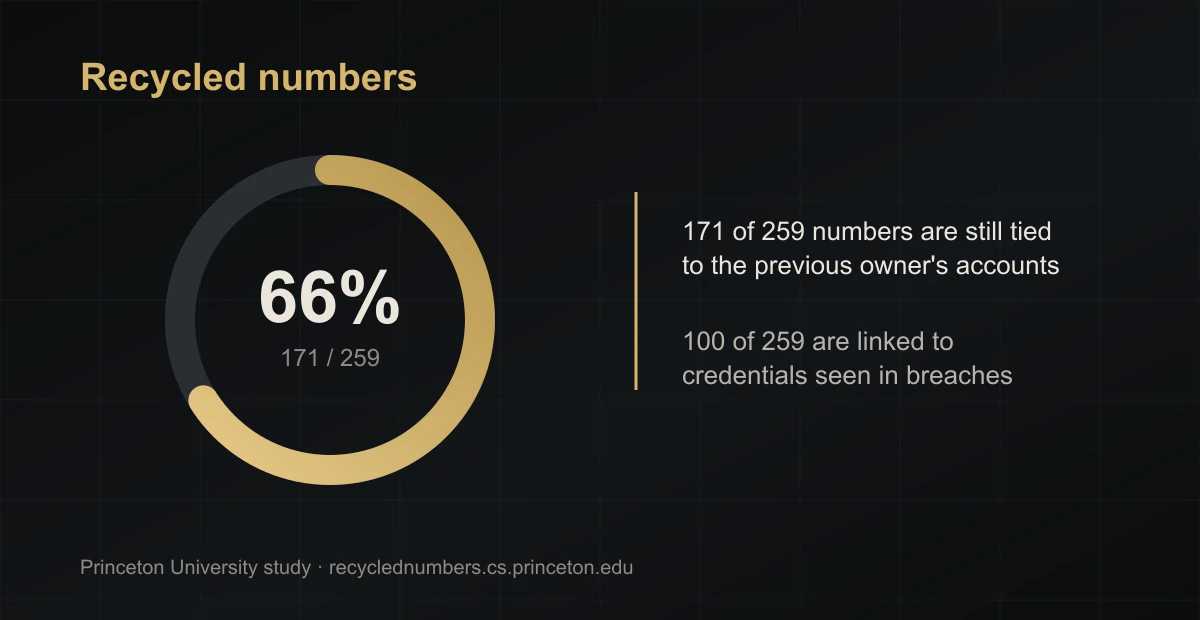
For defense, the conclusion is direct: before you give up a number, unlink it from every account and bank and change it in all your 2FA. For checking someone else's number, it's the reverse: some traces may belong to the previous owner, so findings need rechecking.
Check your number against breaches and monitor your trail#
On HIBP the site search works by email only; phone-number search is available through the API. Phone numbers were loaded into very few breaches, so "clean" doesn't mean "never exposed." Treat any sketchy "number checker" as data disclosure: by entering your number, you expose it.
There's no direct "you're being searched" alert, but there are indirect signals: unexpected inbound payment attempts (someone reading the name), a spike in login attempts and SMS codes, new labels in caller-ID apps. Once a quarter, walk your own number through the channels in this article to see your profile through an outsider's eyes.
If you're a public figure or executive#
For an owner, a public figure, or a lawyer, the threat model is different. The number is often already public: business cards, registries, press. The attacker's task isn't to "find the number" but to enrich it into a dossier and use it for social engineering or a SIM swap against an assistant or the principal. The cost of error is higher: reputation, access to assets, sometimes physical safety.
The priorities are the same but stricter. Keep the personal number off every public link and out of payment apps, and run public communication through a "burner" number or an assistant. Put hardware keys on email and critical services so a hijacked number opens nothing. Apply the carrier port lock to family members and key staff, and train the assistant and CFO against vishing, the "call from the bank" or "from the carrier." The logic is laid out in the piece on what OPSEC is, and support for public figures is described in the Executive Club.
Conclusion#
You really can find someone by their phone number: open channels give up the carrier, messengers, a name, accounts, listings, and breach traces. Lookup bots don't replace that route; they return either wrong data or data you can't use. And "location by number" stays a marketing myth.
For your own number, the conclusion mirrors it: walk the same channels and close the gaps — a carrier port lock, a second factor that isn't SMS, separate numbers for separate roles, unlisting from caller-ID apps. For someone else's, check only as far as the deal requires, and confirm everything with two independent sources.